Introduction
Welcome to Incentra - a reliable, secure, and verifiable incentive distribution platform for DeFi protocols powered by Brevis zkCoprocessor. Incentra is designed to connect protocols with liquidity providers and individual users, and to incentivize liquidity provision, token holding and many other interactions with the protocols. It may help to achieve massive success in increasing the TVL and other forms of user proactivity and engagement with the protocols.
Why Use Incentra
- Powered by Brevis zkCoprocessor, rewards are calculated directly in the ZK circuits and directly verified on-chain, ensuring trustless, transparent and verifiable reward computation. Users can independently verify reward amounts without relying on any centralized authority.
- Backed by Incentra’s reliable SLA that guarantees 99.9% uptime, ensuring minimal disruptions and maximum reliability.
For Incentive Providers
- Sustainable Growth—Incentivize users’ continuous interactions with the protocol and boost user engagement.
- Built for Compliance—Eliminate the risks of centralized fund distribution with a fully on-chain, autonomous reward claim system, ensuring security and compliance at every step.
- Effortless Campaign Management–Quickly and easily launch your incentive campaigns in just a few clicks with no engineering required.
- Transparent and Trustless Incentives—Leverage ZKPs to ensure a fully transparent and trustless reward calculation and distribution process, eliminating dependence on any centralized authority or manual intervention.
- Cross-chain Capability—Allow incentivizing actions on one blockchain while distributing rewards on another, powered by the cross-chain capability of Brevis zkCoprocessor, which allows ZKPs to be verified on any preferred chain.
- High Flexibility—Flexible and adaptable to a wide range of incentive models, with more customization options available soon.
- Access Controls—Restrict eligibility based on address for compliance reasons and preventing scammers.
- Smart Rewards Forwarding—Automatically detect EOA addresses and smart contracts to ensure rewards are distributed correctly, even when LPs interact through third-party contracts like ALM.
- Seamless Integration—Easily integrate the Incentra SDKs for campaigns and rewards data, or use the Incentra Portal as a ready-to-use interface.
For Users and LPs
- Transparent Rewards—Reward calculations are based on ZKPs, allowing users to independently verify reward amounts without relying on a centralized authority.
- No Added Risks—Retain liquidity or token holding while earning rewards without needing to lock up assets or added risks.
- Earn Rewards Easily—Through one single user-friendly interface to participate in campaigns, view total rewards for all eligible campaigns, and easily claim rewards in one single transaction.
- Gas-Efficient—Batch claim rewards in a single transaction, saving on gas fees.
Campaign Types
Incentra is designed to be flexible and adaptable across a wide range of incentive models, including:
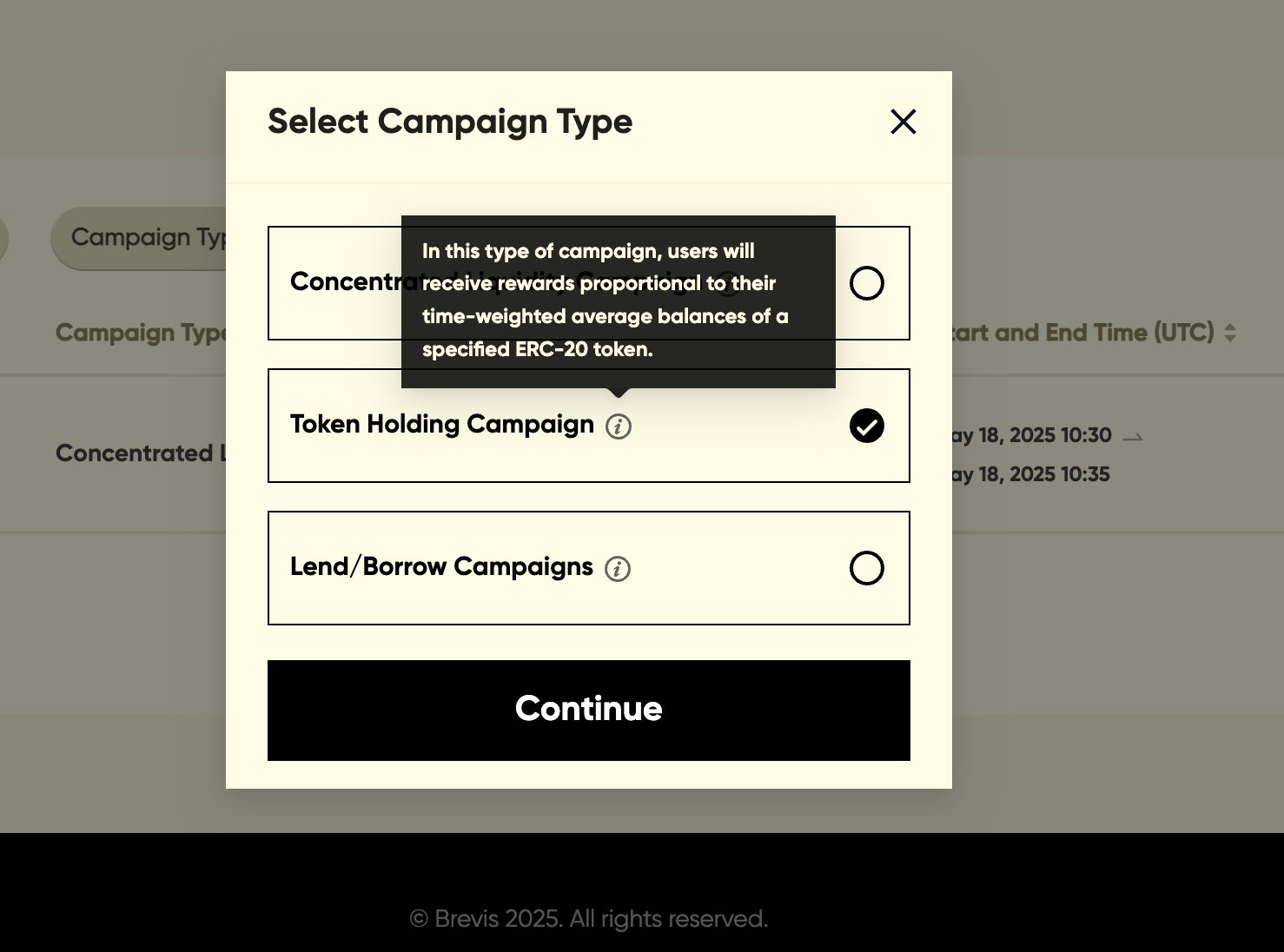
- Token holding campaigns — token holders are rewarded based on the time-weighted average (TWA) balance of an ERC-20 token.
- Concentrated liquidity campaigns — liquidity providers (LPs) are rewarded based on the fees they earn on the Concentrated Liquidity AMM DEXes.
- Lend and borrow campaigns — users are rewarded for lending to or borrowing from a protocol.
Incentra also plans to expand into additional use cases that may be available in future phases. Feel free to contact us if you would like to create a different type of campaign or customize one to fit your specific needs.
Token Holding Campaigns
For a token holding campaign on Incentra, users earn rewards based on the time-weighted average (TWA) balance of a specified ERC-20 token. Rewards are distributed proportionally to each user’s share of the total TWA balances among all eligible users.
By retrieving and calculating token holding data directly from the blockchain, Brevis periodically updates the reward data for all eligible token holders, calculates individual reward allocations, and generates ZK Proofs (ZKPs) to validate the results. These verified results are then utilized by the reward distribution smart contracts to allocate rewards to each individual holder.
The entire process is fully transparent and trustless, allowing users to independently verify their reward amounts through ZKPs while eliminating the need for manual intervention or reliance on a potentially fallible centralized party.
Incentra also provides flexibility through additional features:
- Blacklist: Incentive providers can exclude specific addresses from receiving rewards.
- Staking: Users who stake their tokens in external contracts (such as staking LP tokens in gauge contracts) can still receive rewards.
Note that only a selected list of whitelisted ERC-20 tokens and reward tokens are supported. Please contact us if you’d like to whitelist a token that isn’t currently available.
Concentrated Liquidity Campaigns
For a concentrated liquidity farming campaign on Incentra, liquidity providers (LPs) earn rewards proportional to the fees generated by their positions in the pool of a Concentrated Liquidity AMM DEX such as Uniswap v3.
Brevis retrieves the position data directly from the blockchain and periodically updates the reward data for all LPs. Brevis calculates individual reward distributions and then generates zero-knowledge proofs (ZKPs) to validate the correctness of these calculations. These proofs are then verified on-chain to distribute rewards to LPs accordingly.
Incentra also supports Active Liquidity Management (ALM) protocols, allowing liquidity to be provided to the incentivized pool via ALM while earning rewards. For supported ALM protocols, Incentra automatically distributes rewards to their depositors based on their proportional share of the ALM vault (represented by the vault LP tokens), ensuring a seamless and efficient reward allocation process without requiring any additional user actions. In the initial scope, the following ALM protocols are supported.
Note that only a selected list of whitelisted rewards tokens and pool tokens are supported on Incentra. Please contact us if you’d like to whitelist a token that isn’t currently available.
Lend and Borrow Campaigns
Incentra supports lending and borrowing protocols to reward users for supplying collateral in a vault/pool or borrowing from a vault/pool. The currently supported protocols are Euler, Aave, and Morpho.
Lend/Borrow Campaigns for Euler Finance
- In lending campaigns, rewards are allocated based on each user’s share of the total time-weighted average (TWA) balances of the corresponding eToken among all eligible users.
- In borrowing campaigns, rewards are allocated proportionally to each user’s share of the average debt within the vault. To accommodate the increasing debt due to interests, each user’s averaged debt is calculated using samples at random points of time spacing around 10 minutes.
NOTE: If the user has multiple sub-accounts, the owner account will receive the rewards for all its sub-accounts.
Lend/Borrow Campaigns for Aave
- In lending campaigns, rewards are allocated proportional to each user’s time-weighted average (TWA) aToken balance in the pool. Additionally, if IncentivizeNetLending is enabled, a looping penalty is applied. View here for the detailed formula.
- In borrowing campaigns, rewards are allocated proportionally to each user’s time-weighted average debt token balance in the pool.
Lend Campaigns for Morpho
Only lend campaigns are currently supported for Morpho. Rewards are allocated proportional to each user’s time-weighted average (TWA) vault shares balance. The vault shares represent the user’s proportional ownership of the underlying Morpho pool collaterals.
Brevis fetches eToken, vault shares, and debt data directly from the blockchain, periodically updates balances for all eligible users, calculates individual rewards, and generates zero-knowledge proofs (ZKPs) to ensure the correctness of these calculations. These ZKPs are verified on-chain and the results will be utilized by the rewards distribution contracts to distribute rewards accordingly.
NOTE: The underlying asset token of a vault needs to be whitelisted first before the vault can be used in a campaign. Please contact us if you’d like to whitelist an asset token that isn’t currently available.
Technical Architecture
The diagram below shows Incentra’s high-level architecture and workflow to support a campaign.

A campaign is divided into multiple epochs (e.g., 4 hours per epoch). Once a campaign is created, the Incentra server performs the following actions during each epoch:
- Fetches blockchain data relevant to the campaign.
- Sends the data to Brevis provers to generate rewards info and corresponding ZK proofs for all users.
- Submit the rewards info and ZK proofs to the campaign contract to update rewards on-chain.
Users (i.e., reward earners) can claim their rewards directly from the campaign contract once the rewards info has been updated on-chain.
Fee
By default, Brevis charges 3% of total rewards as the service fee for each campaign launched on Incentra.
Getting Started
On Incentra, campaigns can be created and managed in the Brevis Incentra Portal. Here is a checklist before you create a campaign:
- Whitelist your campaign creator address
- Whitelist the tokens relevant to your campaigns
- Check if your data source chain and reward claim chain is supported
- Contact us if there is any reward forwarding requirements
Campaign Creator Whitelist
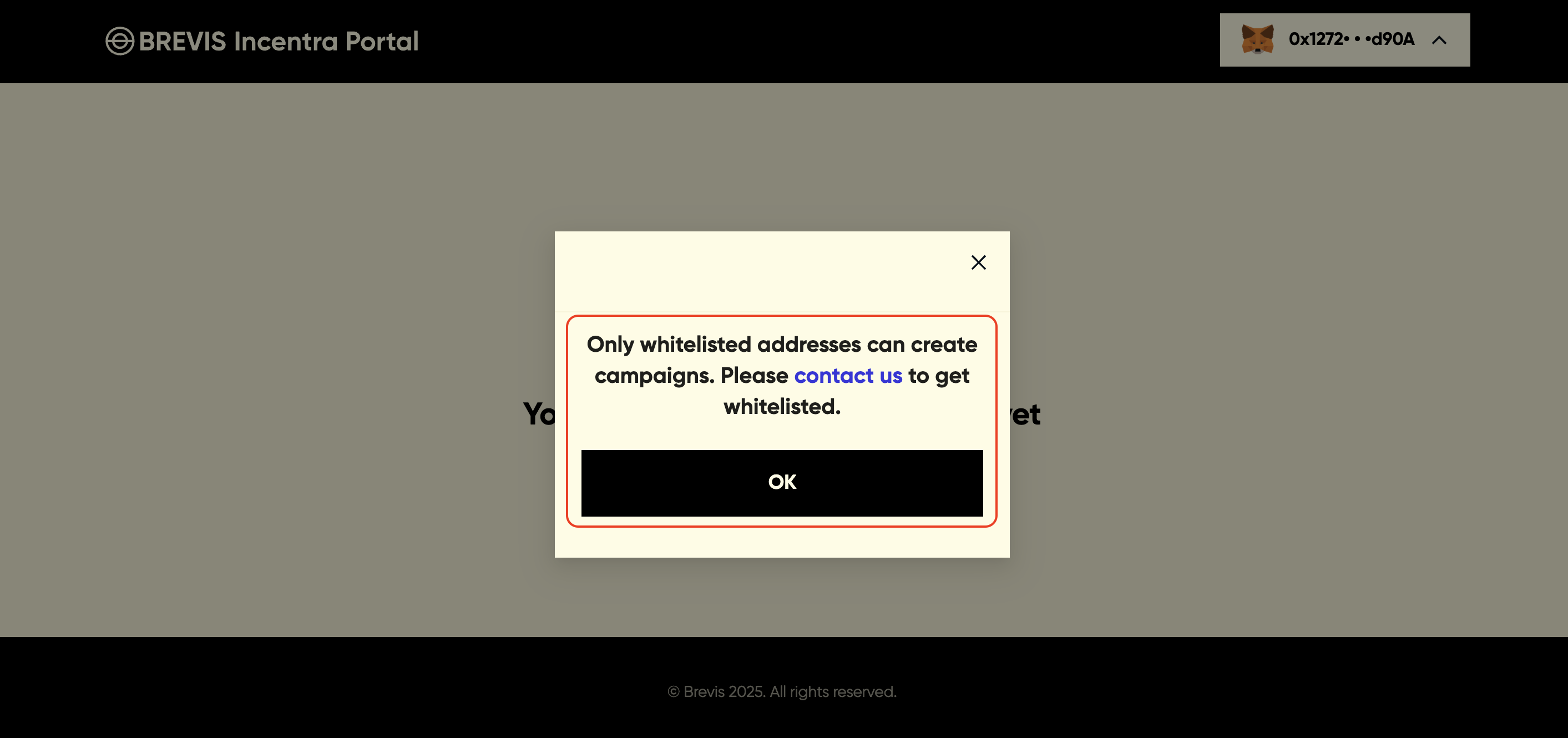
Before getting started, please note that your wallet address must be whitelisted first to create a campaign. While anyone can create a campaign through the smart contract, Incentra exclusively recognizes and processes those created by whitelisted addresses. Please contact us to get whitelisted.
Check Supported Chains
In the Brevis Incentra Portal, you will need to select the “data source chain” and the “reward claim chain”. Data source chain is where your protocol is deployed and reward claim chain is where your reward token is deployed.
Please contact us if you cannot find the data source chain or the reward claim chain that suits your needs. We are happy to add for your requirements.
Token Whitelist
All tokens need to be first whitelisted before they can be configured in the Brevis Incentra Portal, including:
- Reward token in campaign types
- Underlying asset token of an Euler vault in a Lend/Borrow campaign (Euler).
- DEX pool token 0/token 1 in a Concentrated Liquidity campaign.
- Token to be held in a Token Holding campaign
Campaign creators can contact us to whitelist the relevant tokens.
Reward Forwarding Requirements
If your campaign requires advanced reward forwarding, please contact us for support. Common reward forwarding requirements include:
- You would like the campaign to also incentivize users who stake their tokens into a staking contract
- You would like to incentivize users who interact with your protocol with some intermediary such as Active Liquidity Management solutions (e.g., Beefy, Gamma).
Next Steps
The following sections offer step-by-step instructions to guide you through creating different types of campaigns:
- Create a Token Holding Campaign
- Create a Concentrated Liquidity Campaign
- Create a Lend and Borrow Campaign (Euler)
Token Holding Campaign
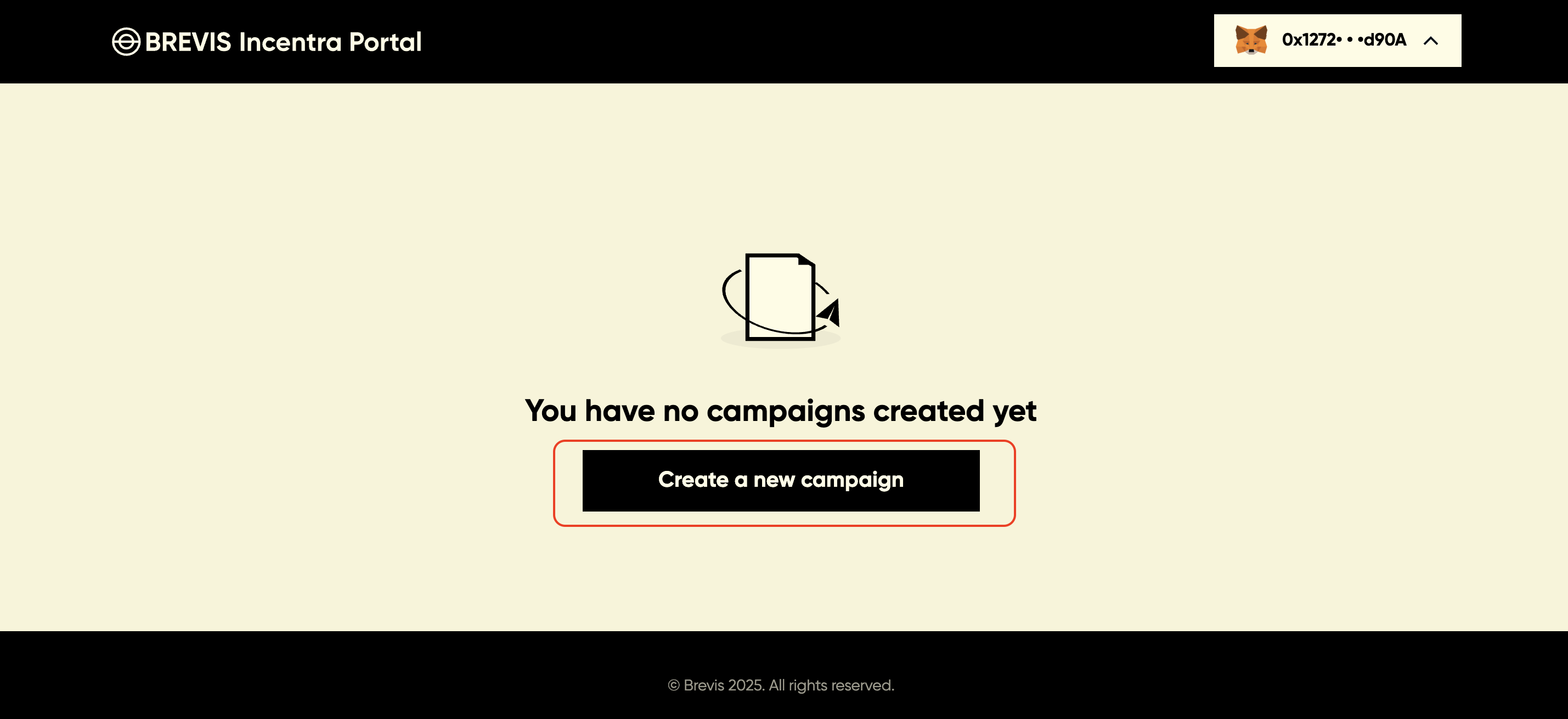
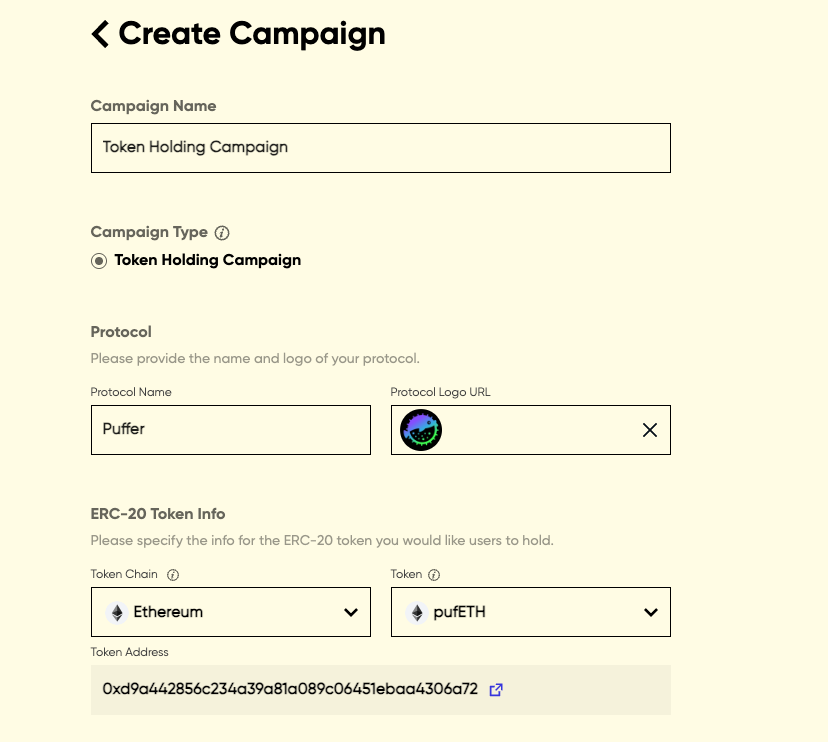
Click “Create a new campaign” to create a campaign, and select the Campaign Type you would like to create.
To create a Token Holding campaign, you need to config the following info:
- Campaign Name
- Protocol Name and Logo
- ERC-20 Token Info: please select the ERC-20 token you would like users to hold. Only a selected list of tokens is supported. Please contact us if you’d like to whitelist a token that isn’t currently available
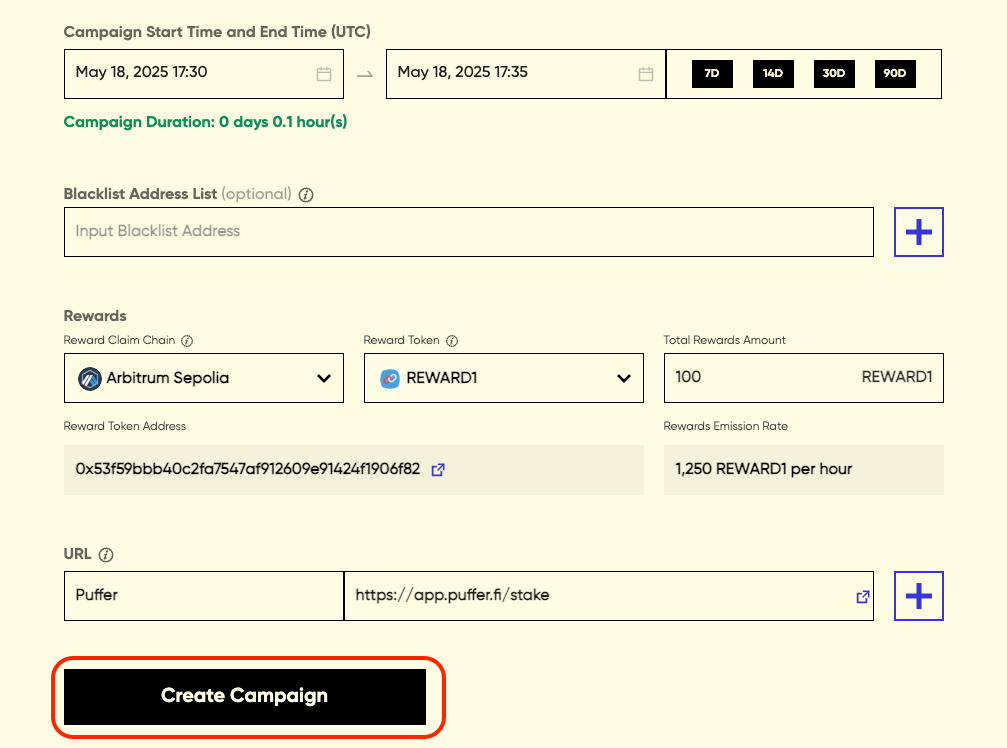
- Campaign Start Time and End Time: select the start time and end time, you could also select to set a 7-day/14-day/30-day/90-day campaign and the campaign end time will be displayed automatically
- Blacklist Address List: it is optional to exclude specific addresses from receiving rewards
- Select Reward Token: select the token you would like to use as a reward token and enter the total rewards amount. Only a selected list of reward tokens is supported. Please contact us if you’d like to whitelist a token that isn’t currently available
- URL: enter the URL of the dApp where users could get the ERC-20 token
Once all the required information is provided, you can click the ‘Create Campaign’ button to confirm the campaign settings.
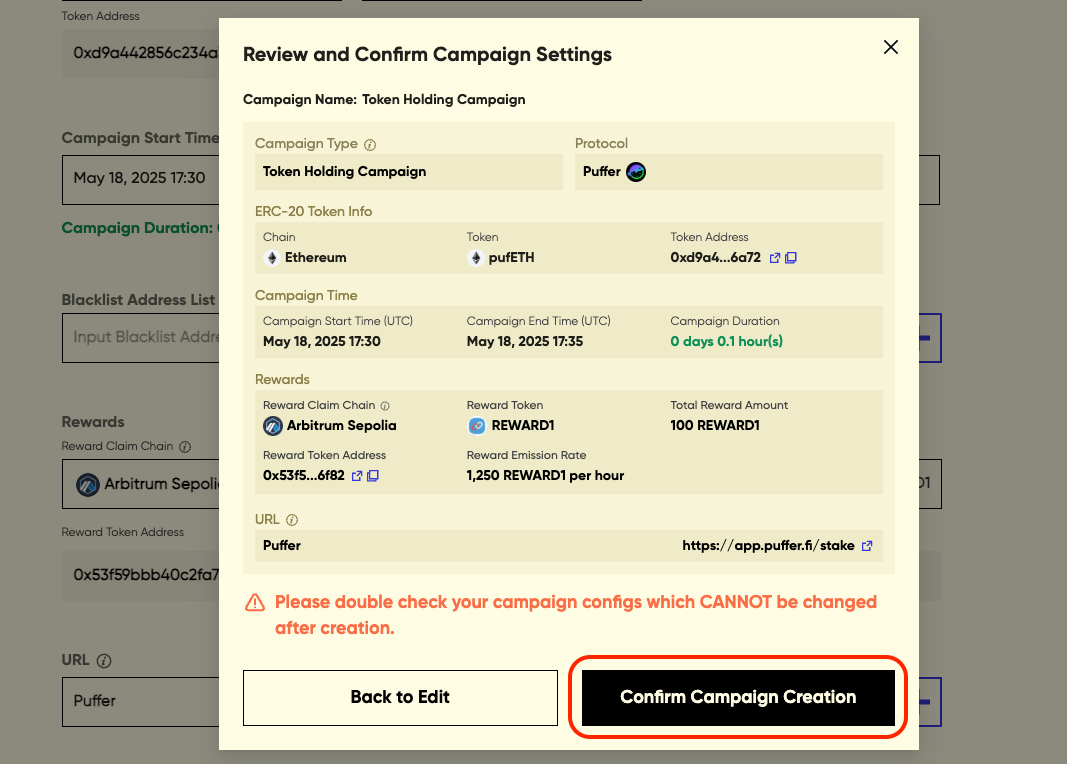
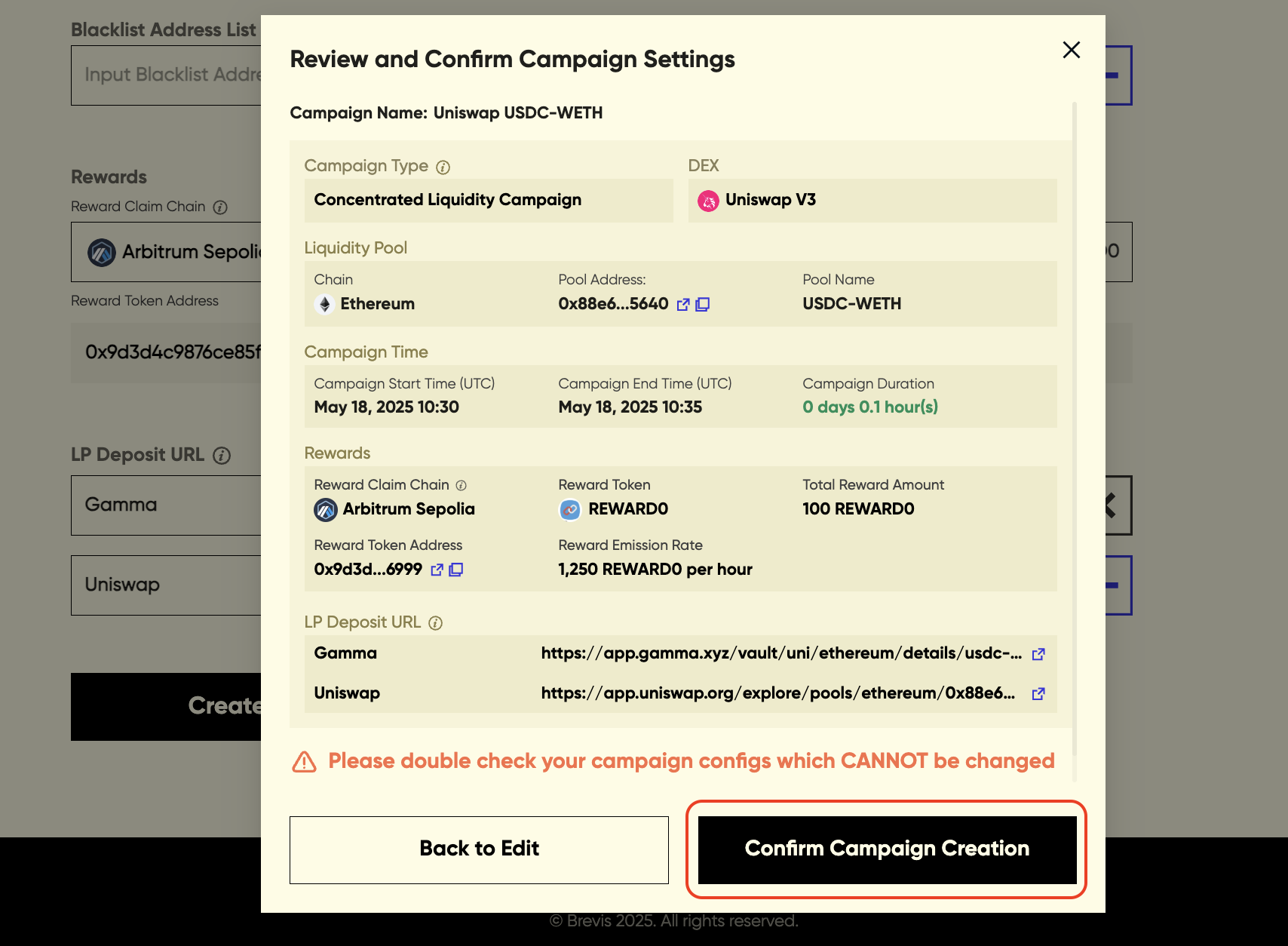
Please review and confirm your campaign settings before launching the campaign as the configs cannot be changed after creation.
Once the campaign settings are submitted, the campaign will be created.
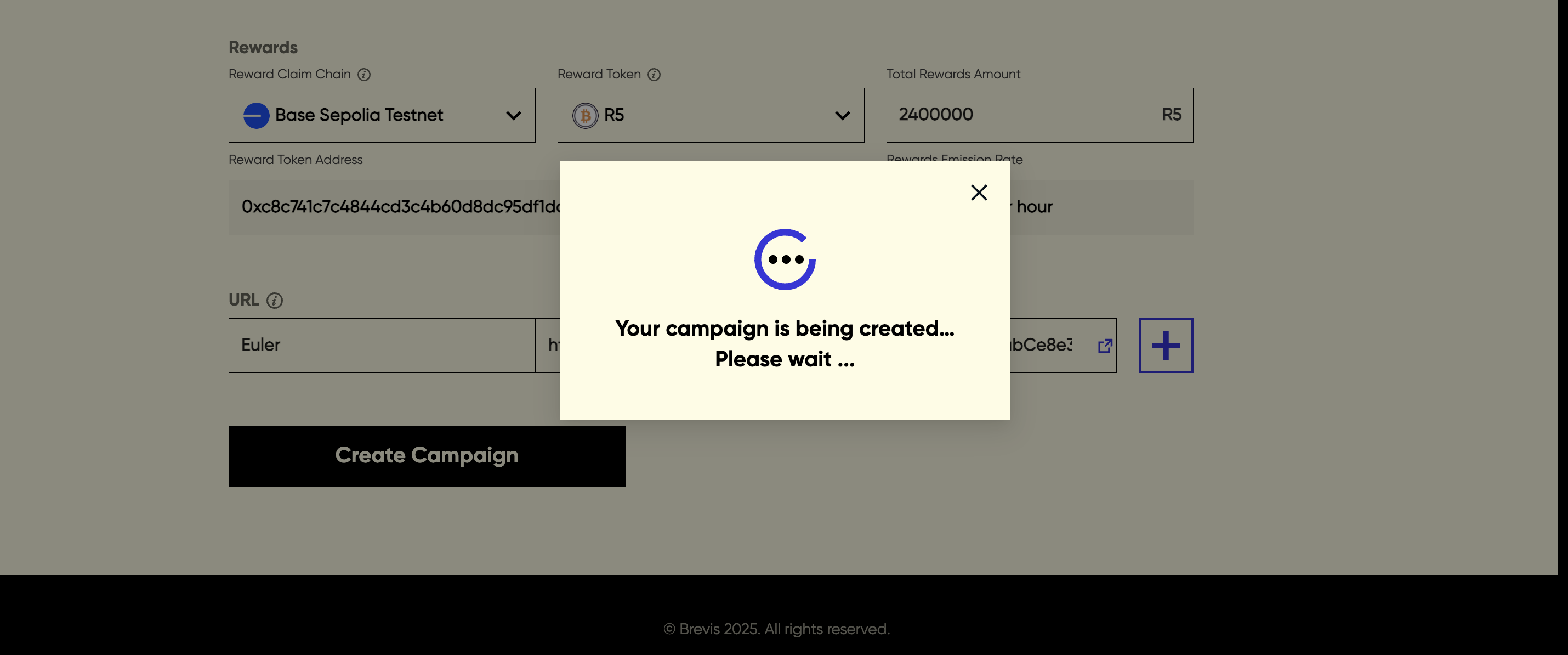
You would see a pop-up with a campaign ID and view the campaign creation tx hash in explorer, confirming that your campaign has been successfully created.
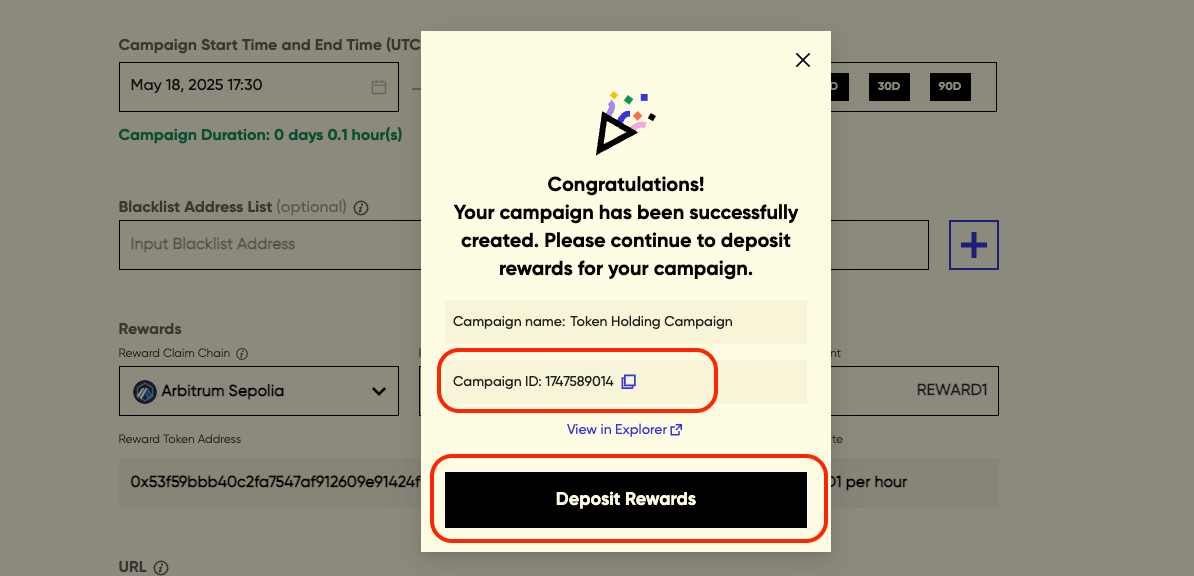
You may also see the campaign creation is failed or campaign is creating, and could retry the campaign creation in the campaign page.
Note: To deposit rewards, you may also directly transfer reward tokens to the campaign contract via a simple ERC-20 transfer from a different address (e.g., a multi-sig) later.
Once the campaign is created, please deposit the rewards into the reward contract to enable reward distribution. You may deposit rewards while the campaign is to be started, active, or even ended. By default, the total rewards amount should be deposited.
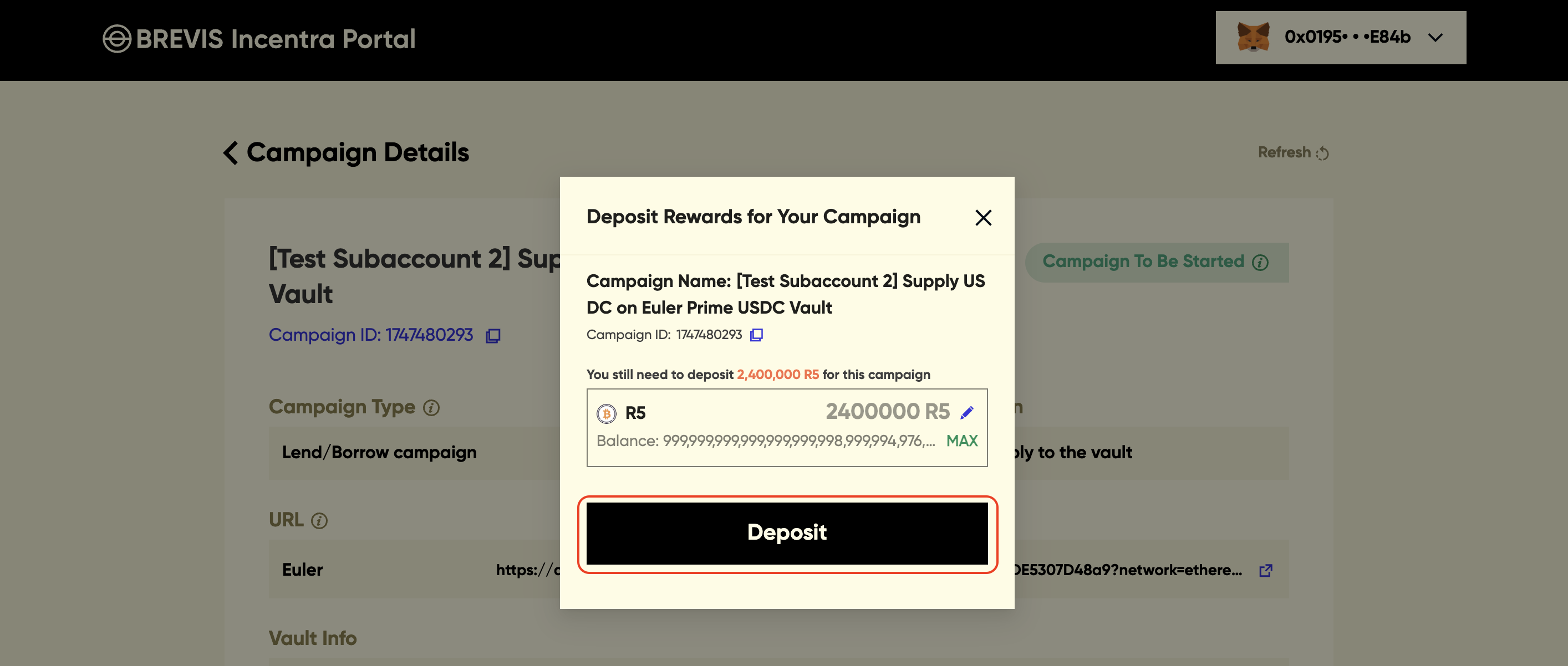
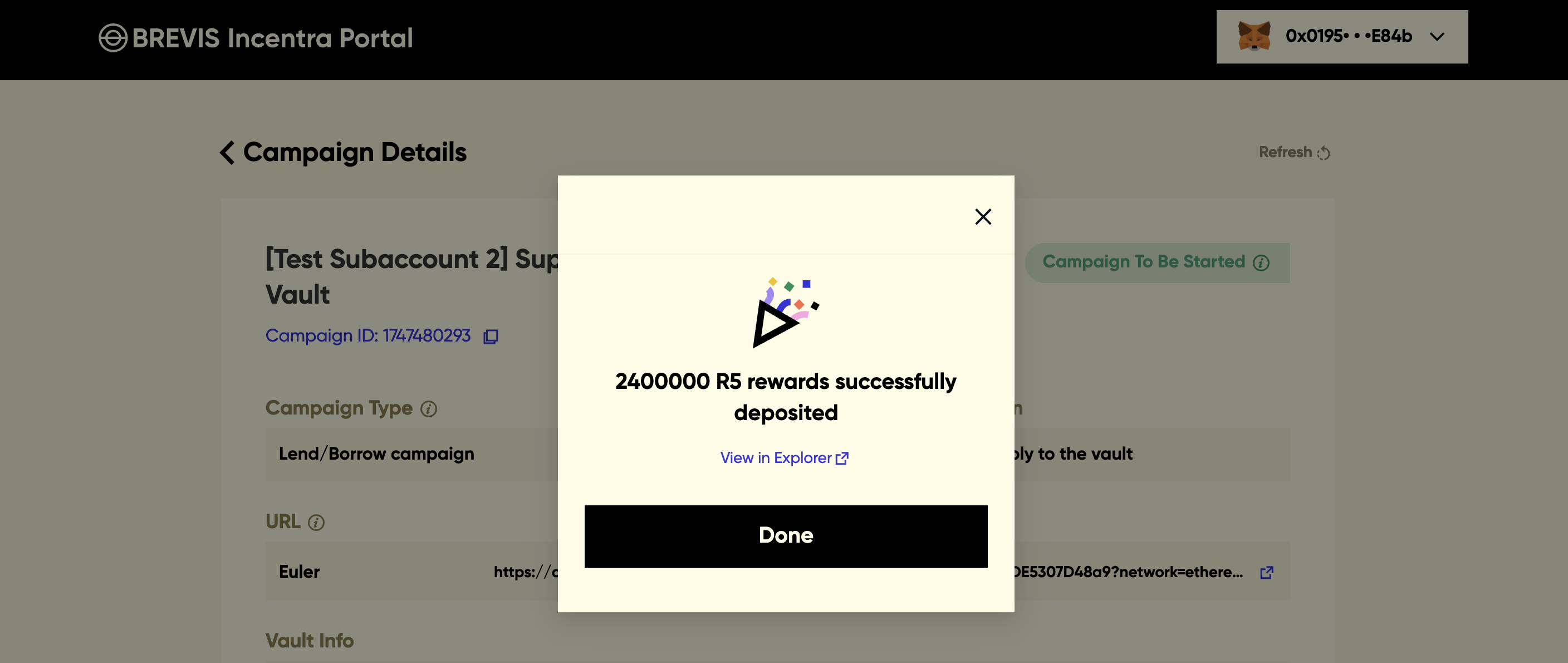
Once the reward tokens are deposited, congratulations — you’re all set!
Concentrated Liquidity Campaign
Click “Create a new campaign” to create a campaign, and select the Campaign Type you would like to create.
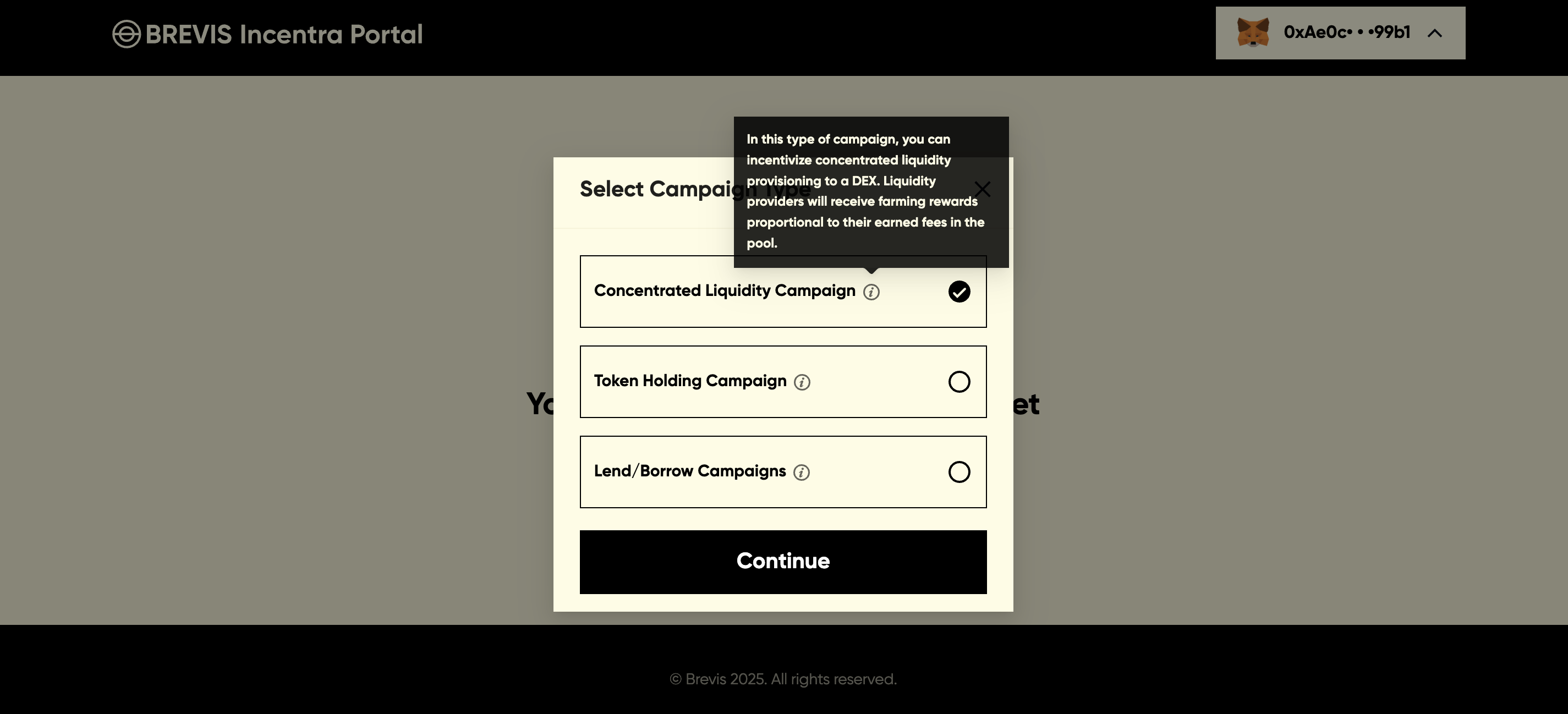
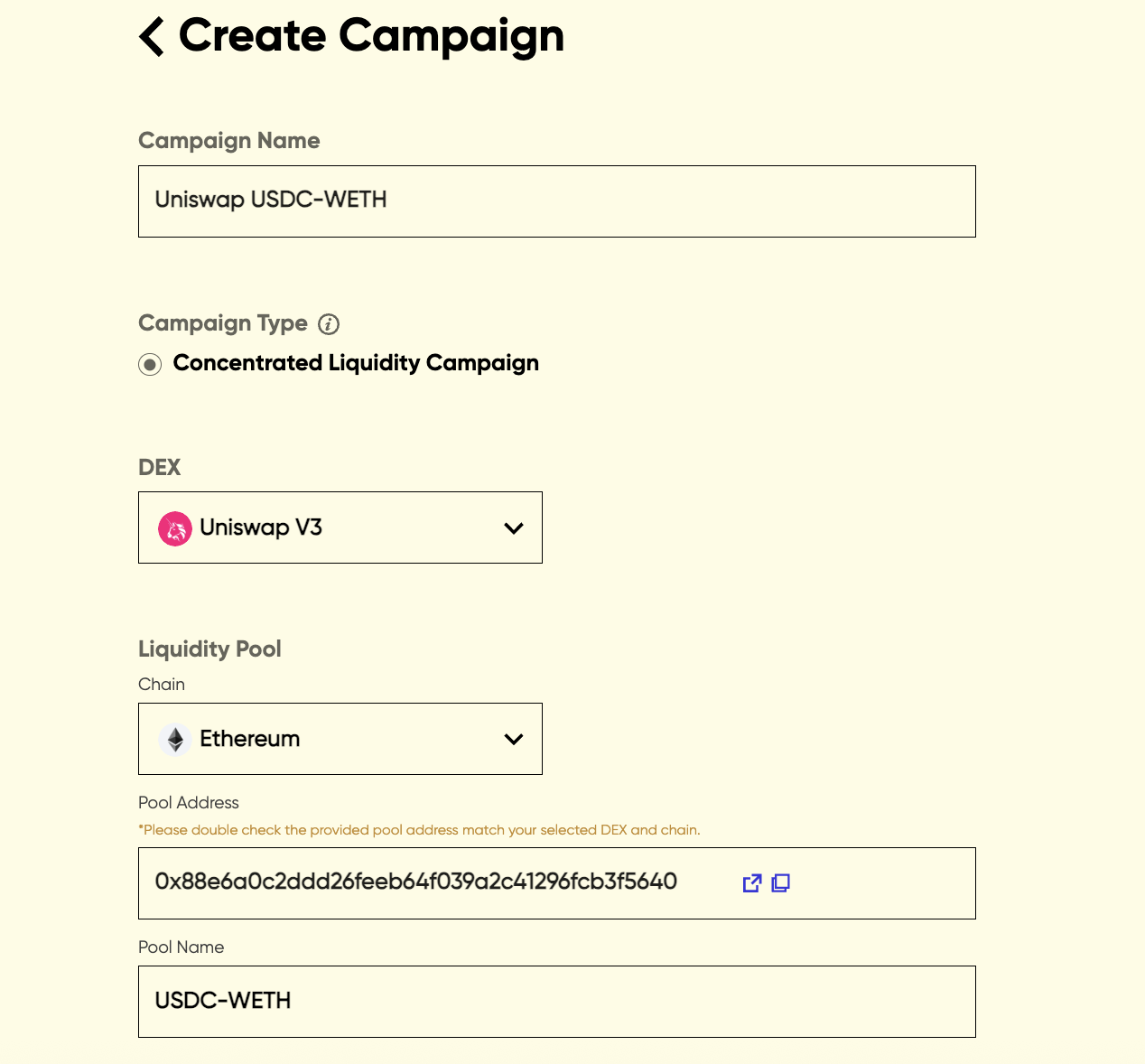
To create a Concentrated Liquidity campaign, you need to config the following info:
- Campaign Name
- Dex
- Liquidity Pool: select the chain where the pool is deployed, enter the pool address and the pool name
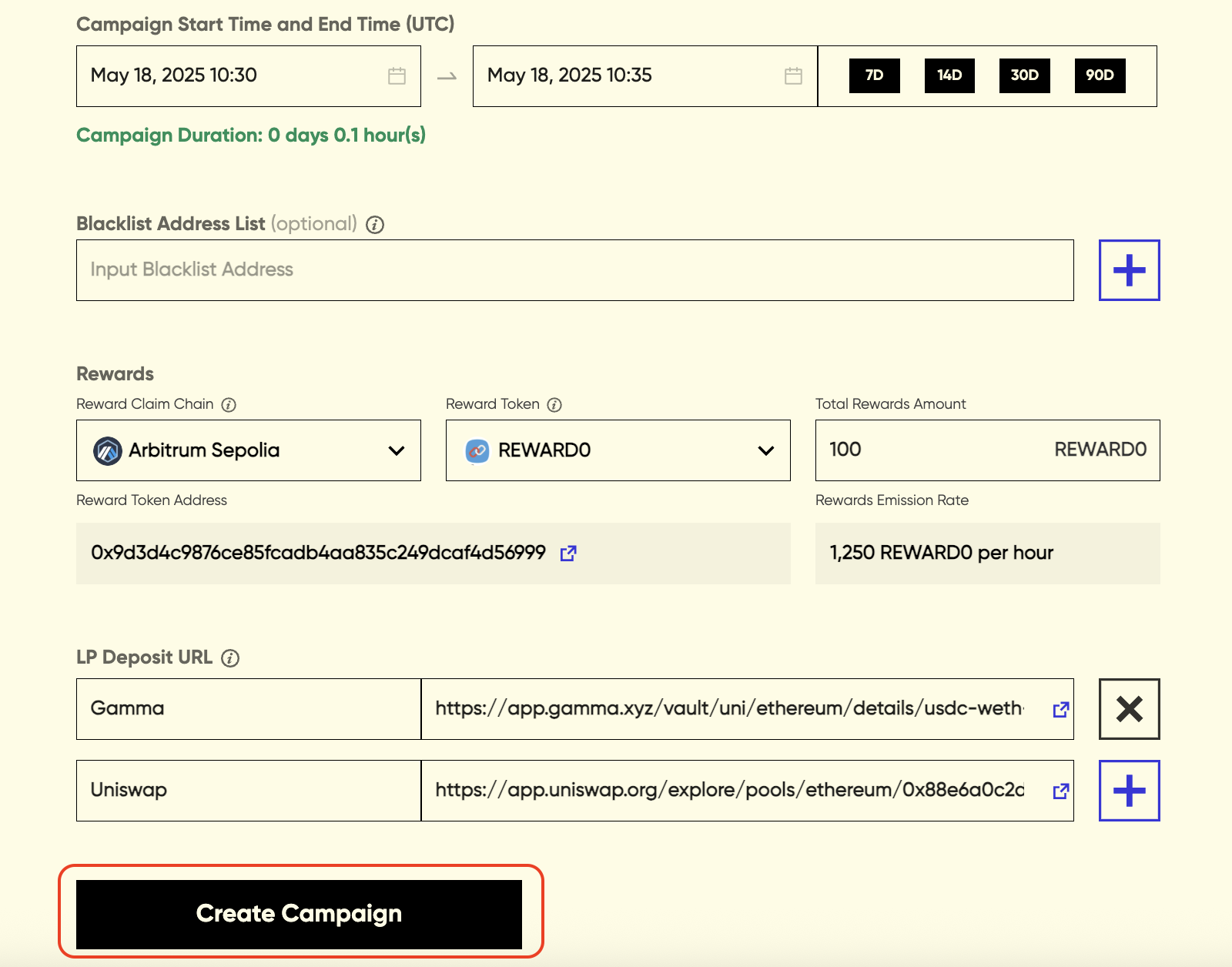
- Campaign Start Time and End Time: select the start time and end time, you could also select to set a 7-day/14-day/30-day/90-day campaign and the campaign end time will be displayed automatically
- Blacklist Address List: it is optional to exclude specific addresses from receiving rewards
- Select Reward Token: select the token you would like to use as a reward token and enter the total rewards amount. Only a selected list of reward tokens is supported. Please contact us if you’d like to whitelist a token that isn’t currently available
- URL: enter the URL of the dApp where LPs could deposit liquidity
Once all the required information is provided, you can click the ‘Create Campaign’ button to confirm the campaign settings.
Please review and confirm your campaign settings before launching the campaign as the configs cannot be changed after creation.
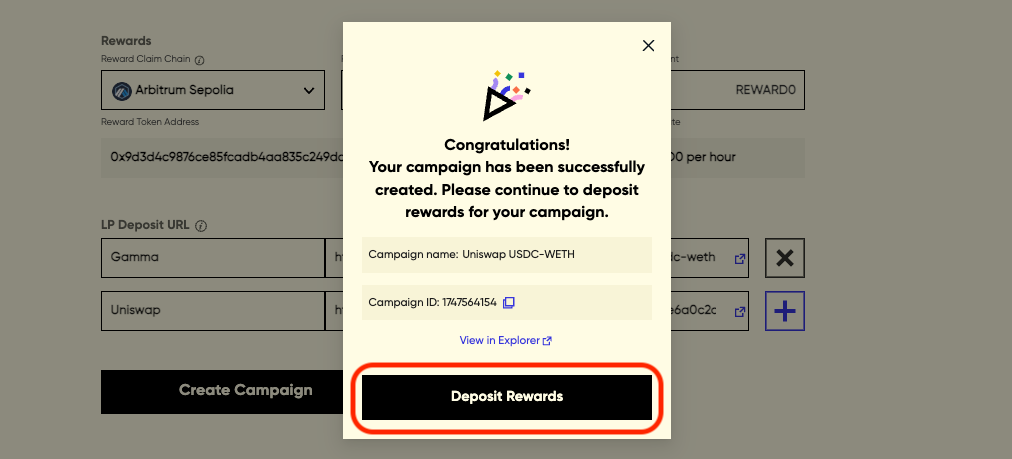
Once the campaign settings are submitted, the campaign will be created.
You would see a pop-up with a campaign ID and view the campaign creation tx hash in explorer, confirming that your campaign has been successfully created.
You may also see the campaign creation is failed or campaign is creating, and could retry the campaign creation in the campaign page.
Note: To deposit rewards, you may also directly transfer reward tokens to the campaign contract via a simple ERC-20 transfer from a different address (e.g., a multi-sig) later.
Once the campaign is created, please deposit the rewards into the reward contract to enable reward distribution. You may deposit rewards while the campaign is to be started, active, or even ended. By default, the total rewards amount should be deposited.
Once the reward tokens are deposited, congratulations — you’re all set!
Lend and Borrow Campaign
Click “Create a new campaign” to create a campaign, and select the Campaign Type you would like to create.
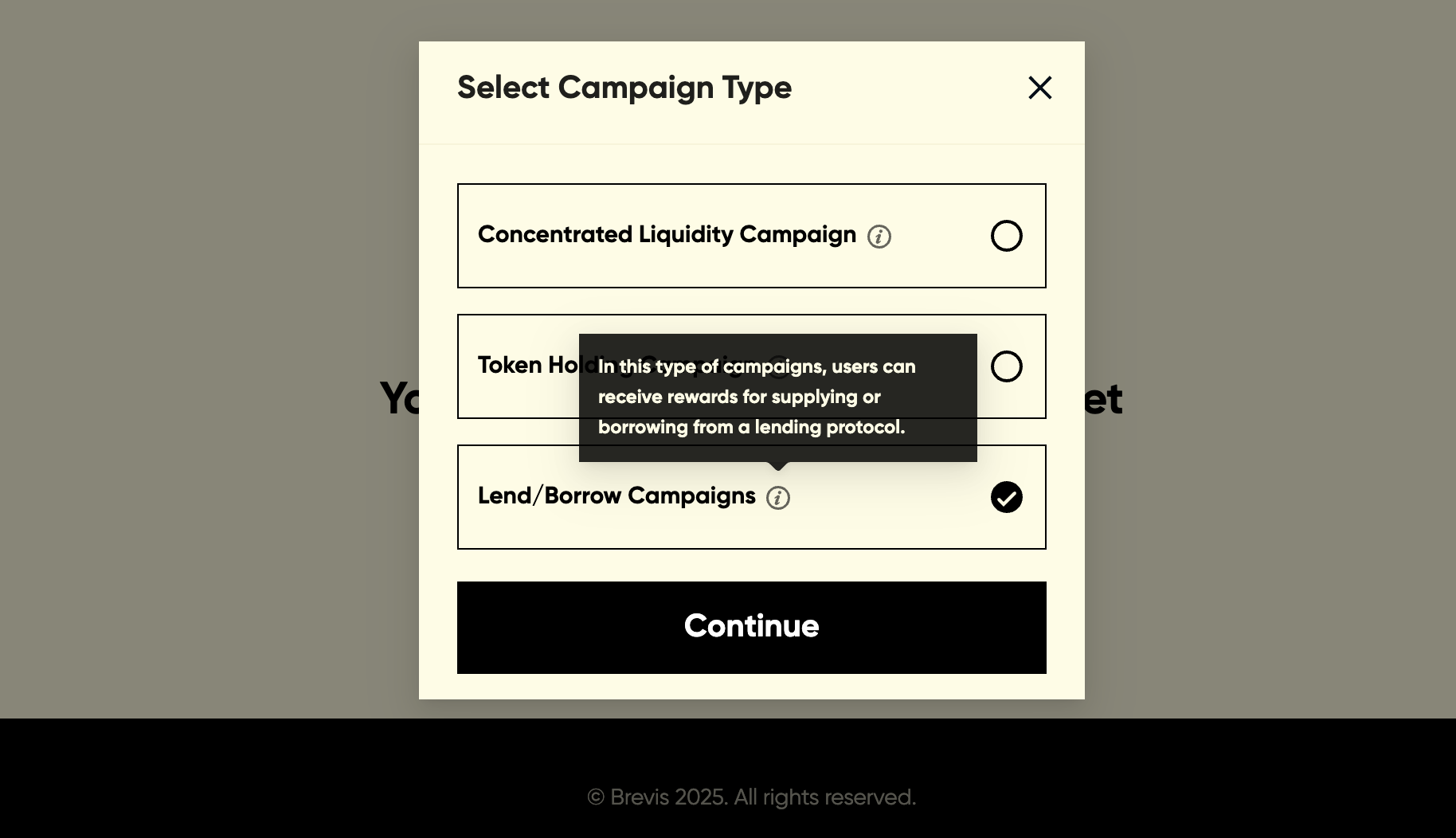
Select the lending protocol (Euler/Aave/Morpho) to be incentivized.
.png)
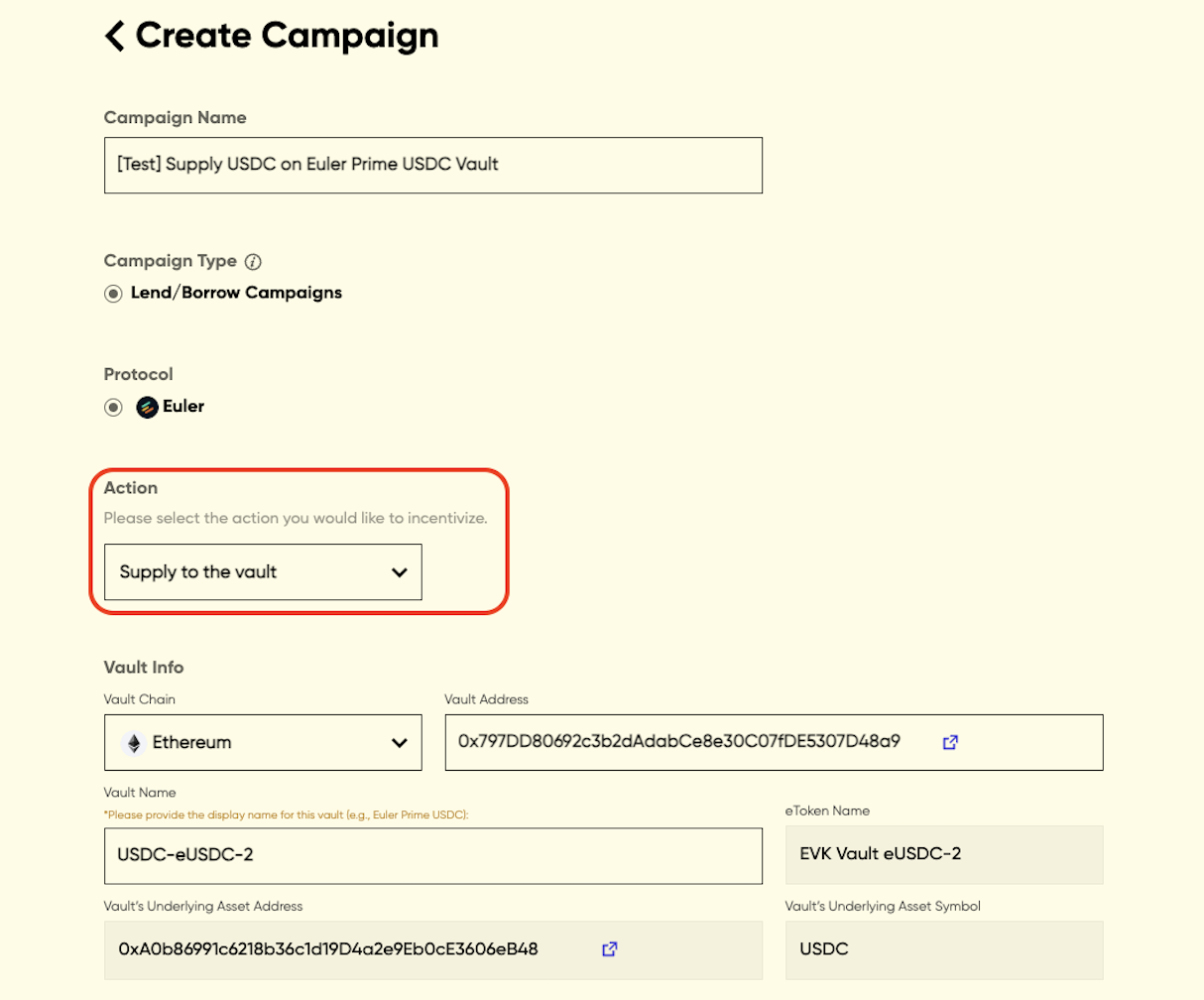
To create a Euler campaign, you need to configure the following info:
- Campaign Name
- Action: the action you would like to incentivize - supply to a vault or borrow from a vault
- Vault Info: select the chain where the vault is deployed and enter the vault address. The vault information should be displayed automatically. You may also enter the vault name if this is the first time setting up a campaign for this vault.
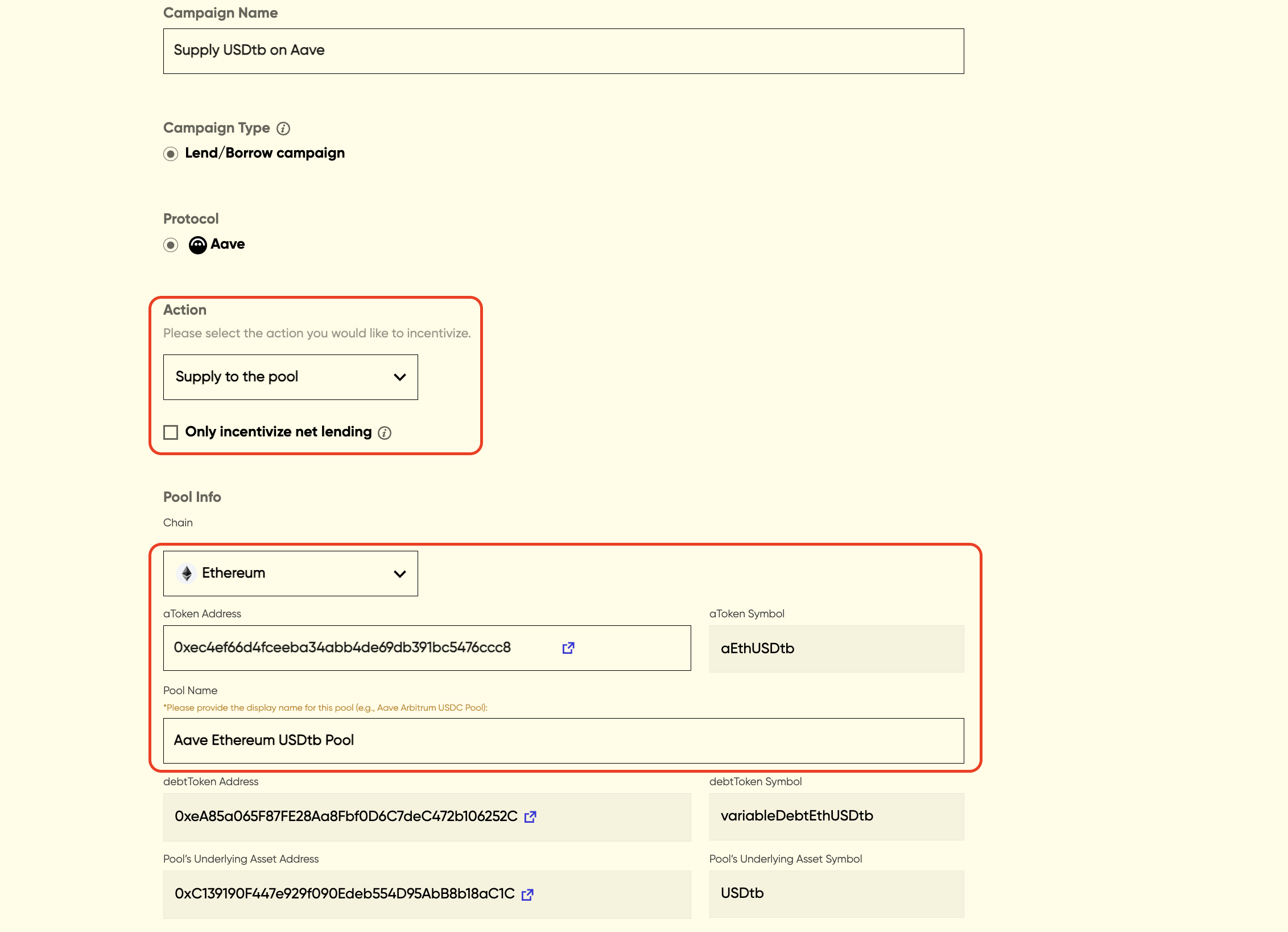
To create an Aave campaign, you need to configure the following info:
- Campaign Name
- Action: the action you would like to incentivize - supply to a pool or borrow from a pool.
- For a lending campaign, you can optionally choose to incentivize net lending, where users will only receive rewards based on their net position values in the pool. View here for detailed rules about net lending.
- Pool Info: select the chain where the pool is deployed and enter the aToken address. The pool information should be displayed automatically. You should also enter the pool name if this is the first time setting up a campaign for this pool.
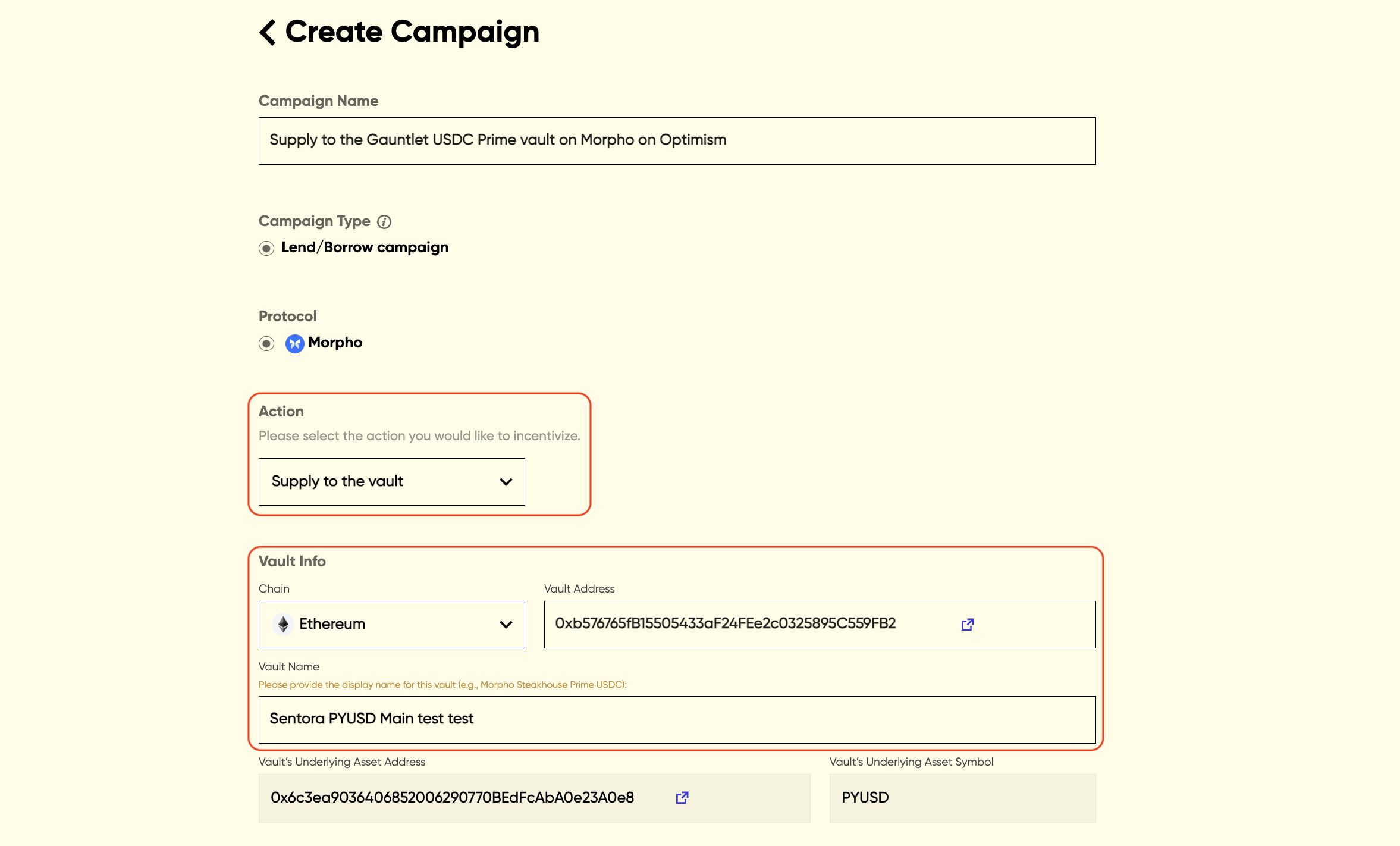
To create a Morpho campaign, you need to configure the following info:
- Campaign Name
- Action: the action you would like to incentivize - supply to a vault. Only lend campaigns are currently supported for Morpho.
- Vault Info: select the chain where the vault is deployed and enter the vault address. The vault information should be displayed automatically. You should also enter the vault name if this is the first time setting up a campaign for this vault.
Note: Only Morpho v2 vault is supported at this moment.
The following parameters may also need to be configured for Euler, Aave, and Morpho campaigns:
- Campaign Start Time and End Time: select the start time and end time, you could also select to set a 7-day/14-day/30-day/90-day campaign and the campaign end time will be displayed automatically
- Blacklist Address List: it is optional to exclude specific addresses from receiving rewards
- Select Reward Token: select the token you would like to use as a reward token and enter the total rewards amount. Only a selected list of reward tokens is supported. Please contact us if you’d like to whitelist a token that isn’t currently available
- URL: enter the URL of the dApp where users could supply or borrow
Once all the required information is provided, you can click the ‘Create Campaign’ button to confirm the campaign settings.
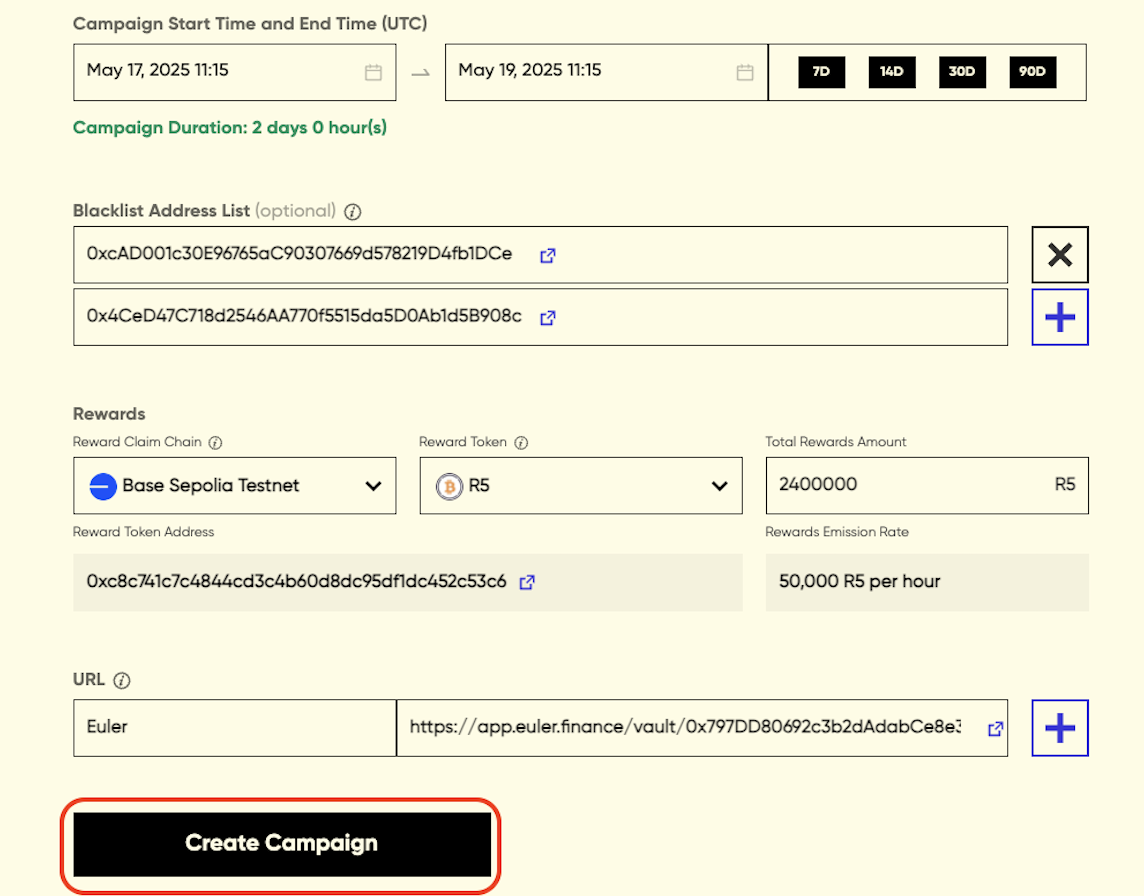
Please review and confirm your campaign settings before launching the campaign as the configs cannot be changed after creation.
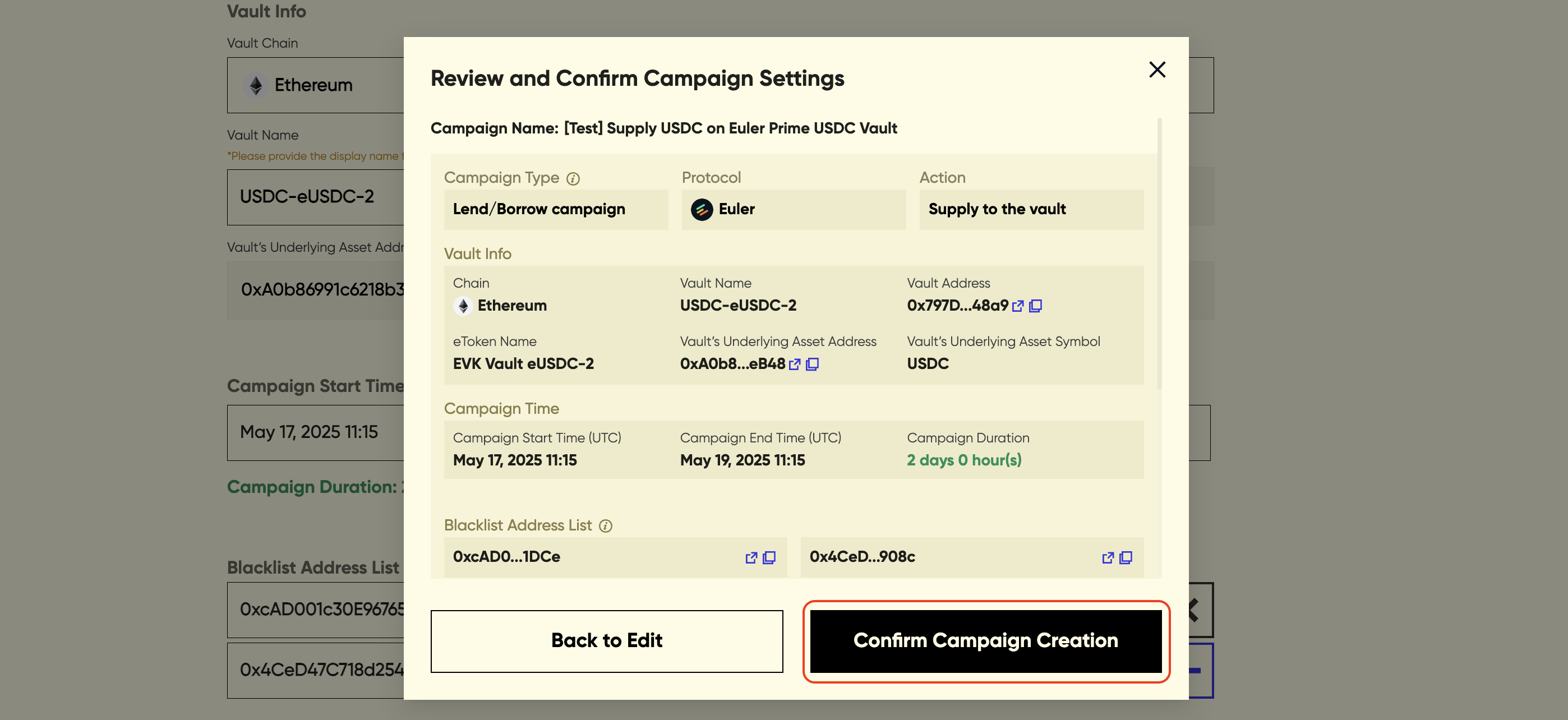
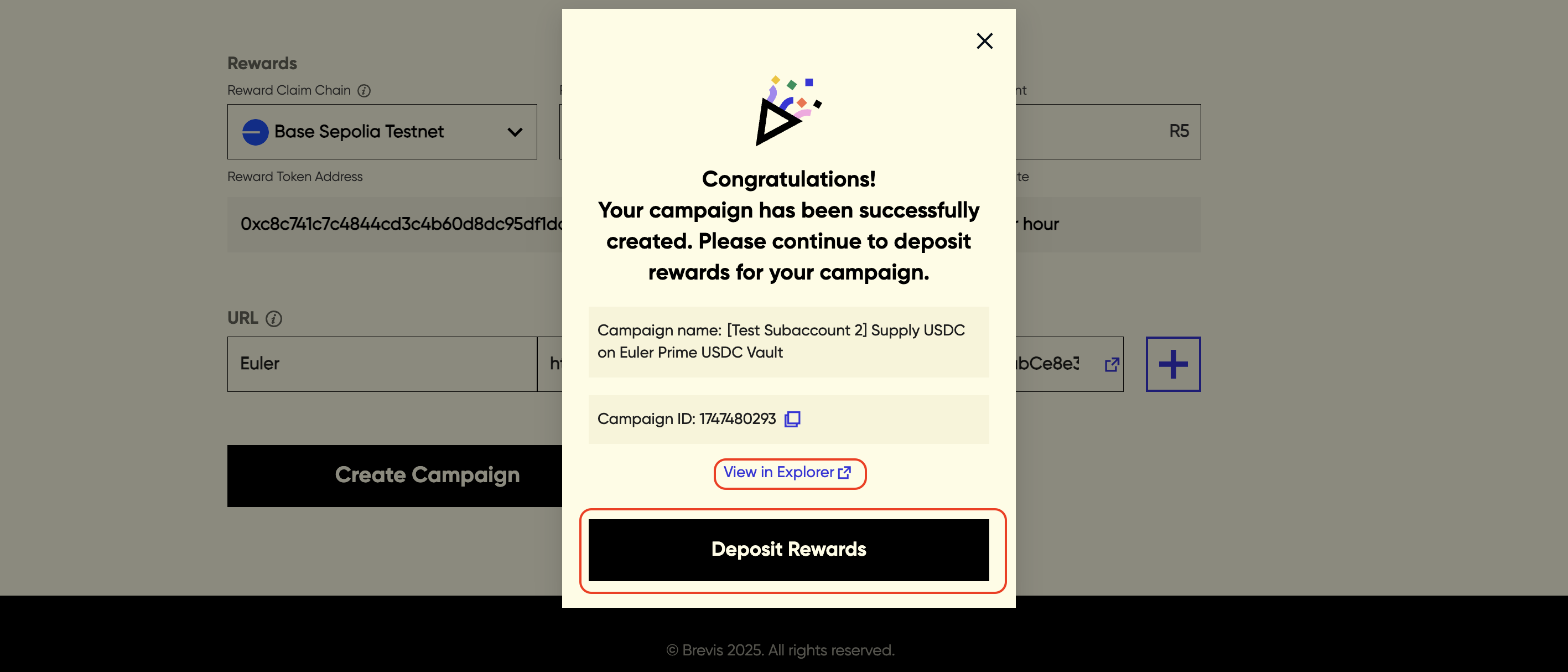
Once the campaign settings are submitted, the campaign will be created.
.png)
You would see a pop-up with a campaign ID and view the campaign creation tx hash in explorer, confirming that your campaign has been successfully created.
You may also see the campaign creation is failed or campaign is creating, and could retry the campaign creation in the campaign page.
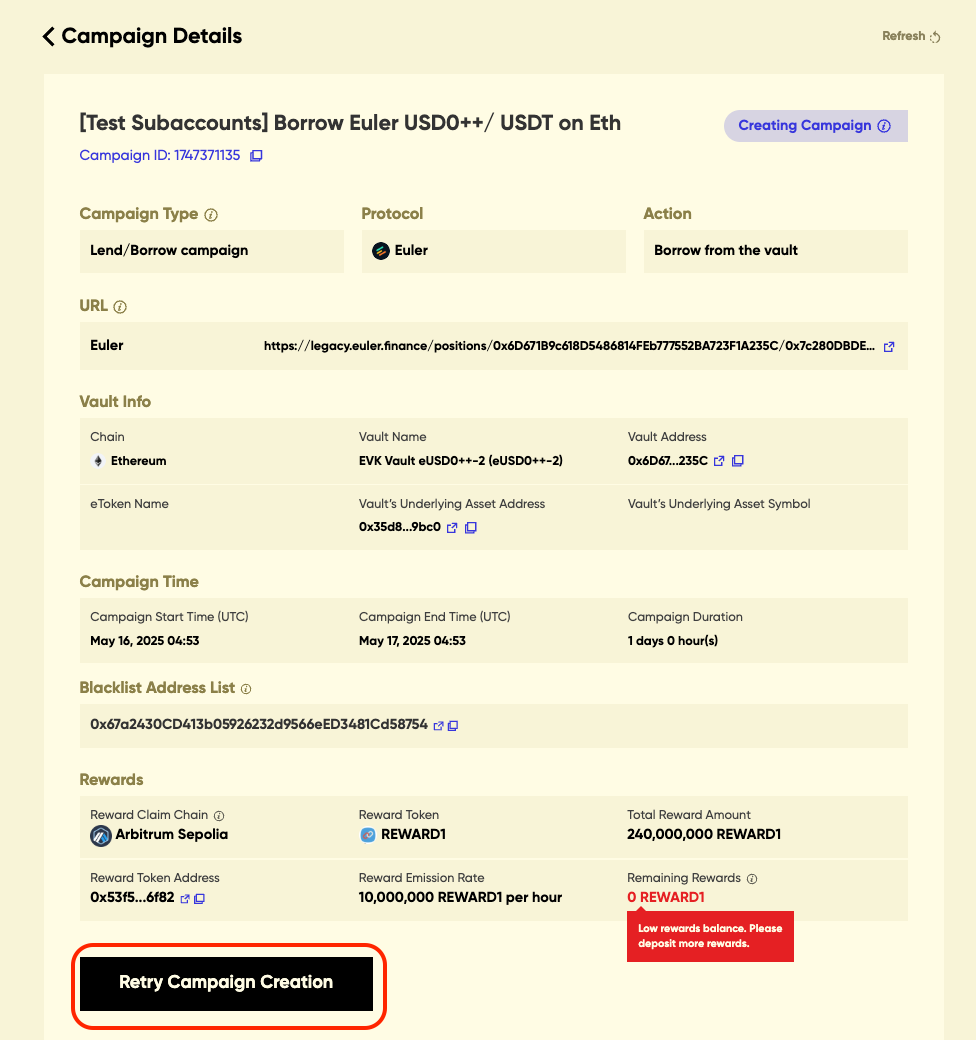
Once the campaign is created, please deposit the rewards into the reward contract to enable reward distribution. You may deposit rewards while the campaign is to be started, active, or even ended. By default, the total rewards amount should be deposited.
Note: To deposit rewards, you may also directly transfer reward tokens to the campaign contract via a simple ERC-20 transfer from a different address (e.g., a multi-sig) later.
Once the reward tokens are deposited, congratulations — you’re all set!
Campaign Rules
Common Rules
Below is the description of rules that apply to all campaign types.
Epoch
All users’ rewards are attested and updated periodically. The current period is 4 hours. Users might see their rewards updated slightly longer (e.g., 30 minutes) than 4 hours due to the time to generate ZK proofs for users’ rewards.
Also, for the 1st epoch after the campaign starts, it may take significantly more time (4 to 12 hours) to update the rewards due to the time to index and fetch relevant historical on-chain data (events, storage, transactions).
In some rare cases (e.g., there is a spike in campaign participants), the rewards update delay may be significantly longer than 4 hours as we expand system capacity and resolve the issues. Rest assured that the rewards in the delayed epochs will still be proved.
Dust Rewards
For each epoch, if a user’s rewards < $0.0001 in the epoch, the user’s rewards won’t be attested for the epoch.
Reward Rules for Each Campaign Types
Concentrated Liquidity Campaign
In a concentrated liquidity campaign, each liquidity provider (LP) is allocated rewards proportional to the fees earned:
LP campaign reward in an epoch = fees earned by LP in the epoch / total fees earned by all LPs in the epoch * total campaign rewards in the epoch * (100% - campaign fee)
Here, campaign fee is the percentage of fees charged by the Incentra platform.
NOTE: If there is no swap during an epoch, this epoch will be skipped and no LPs will get rewards for this empty epoch.
Token Holding Campaign
In a token holding campaign, each token holder is allocated rewards proportional to the Time-Weighted Averaged (TWA) token balance in the epoch:
user campaign reward in an epoch = TWA of the user in the epoch / sum of TWAs of all users in the epoch * total campaign rewards in the epoch * (100% - campaign fee)
Here, campaign fee is the percentage of fees charged by the Incentra platform.
NOTE: A user needs to directly hold the token in the wallet to receive the campaign rewards unless explicitly specified (e.g., if specified, staking the token into a staking contract may also earn rewards even if the token is not directly held in the wallet).
Lend/Borrow Campaign (Euler)
In an Euler supply campaign, each supplier is allocated rewards proportional to the Time-Weighted Averaged (TWA) eToken balance for the vault in the epoch:
user campaign reward in an epoch = eToken TWA of the user in the epoch / sum of eToken TWAs of all users in the epoch * total campaign rewards in the epoch * (1 - campaign fee)
Here, campaign fee is the percentage of fees charged by the Incentra platform.
In an Euler borrow campaign, each borrower is allocated rewards proportional to the average debt (dToken balance) for t he vault in the epoch:
user campaign reward in an epoch = user’s average debt in the epoch / sum of average debts of all users in the epoch * total campaign rewards in the epoch * (100% - campaign fee)
The average debt is calculated using samples at random points of time every 10 minutes in order to accommodate the increasing debt due to interests.
NOTE: If the user has multiple sub-accounts, the owner account will receive the rewards for all its sub-accounts.
Lend/Borrow Campaign (Aave)
In an Aave lending campaign, each supplier is allocated rewards proportional to the Effective Supply Balance (ESB) for the pool in the epoch:
user campaign reward in an epoch = ESB of the user in the epoch / sum of ESB of all users in the epoch * total campaign rewards in the epoch * (1 - campaign fee)
Here, campaign fee is the percentage of fees charged by the Incentra platform.
ESB equals to Time-Weighted Average (TWA) aToken balance if the campaign does not enable “only incentivize net lending”. Otherwise, ESB equals to aToken TWA - debtToken TWA / pool LTV ratio, which penalizes looping in the same pool.
In an Aave borrow campaign, each borrower is allocated rewards proportional to the average debt (debtToken balance) for the pool in the epoch:
user campaign reward in an epoch = user’s average debt in the epoch / sum of average debts of all users in the epoch * total campaign rewards in the epoch * (100% - campaign fee)
Lend Campaign (Morpho)
In a Morpho lending campaign, each supplier is allocated rewards proportional to the Time-Weighted Average collateral value the pool in the epoch:
user campaign reward in an epoch = collateral TWA of the user in the epoch / sum of collaterals of all users in the epoch * total campaign rewards in the epoch * (1 - campaign fee)
Here, campaign fee is the percentage of fees charged by the Incentra platform.
User Tutorials
Welcome to Brevis Incentra — https://incentra.brevis.network/ — for participating in incentive campaigns and claim your rewards. To earn and claim rewards on Incentra, you will need to connect your wallet first.
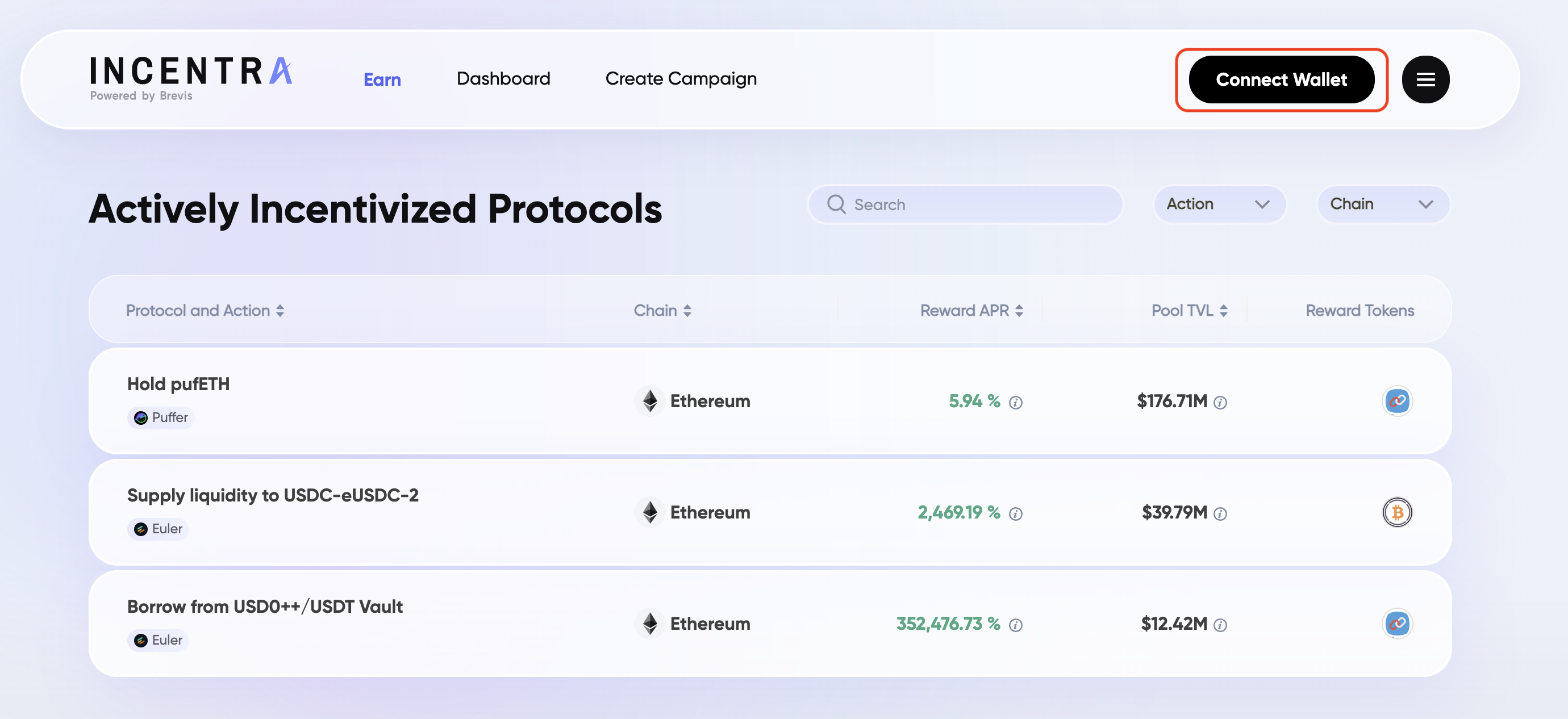
Discover Campaigns
By default, you will see the “Earn” page, which lists all available campaigns on Incentra. By clicking on each row, you can view details of the active campaigns and access the URL to participate and start earning right away!
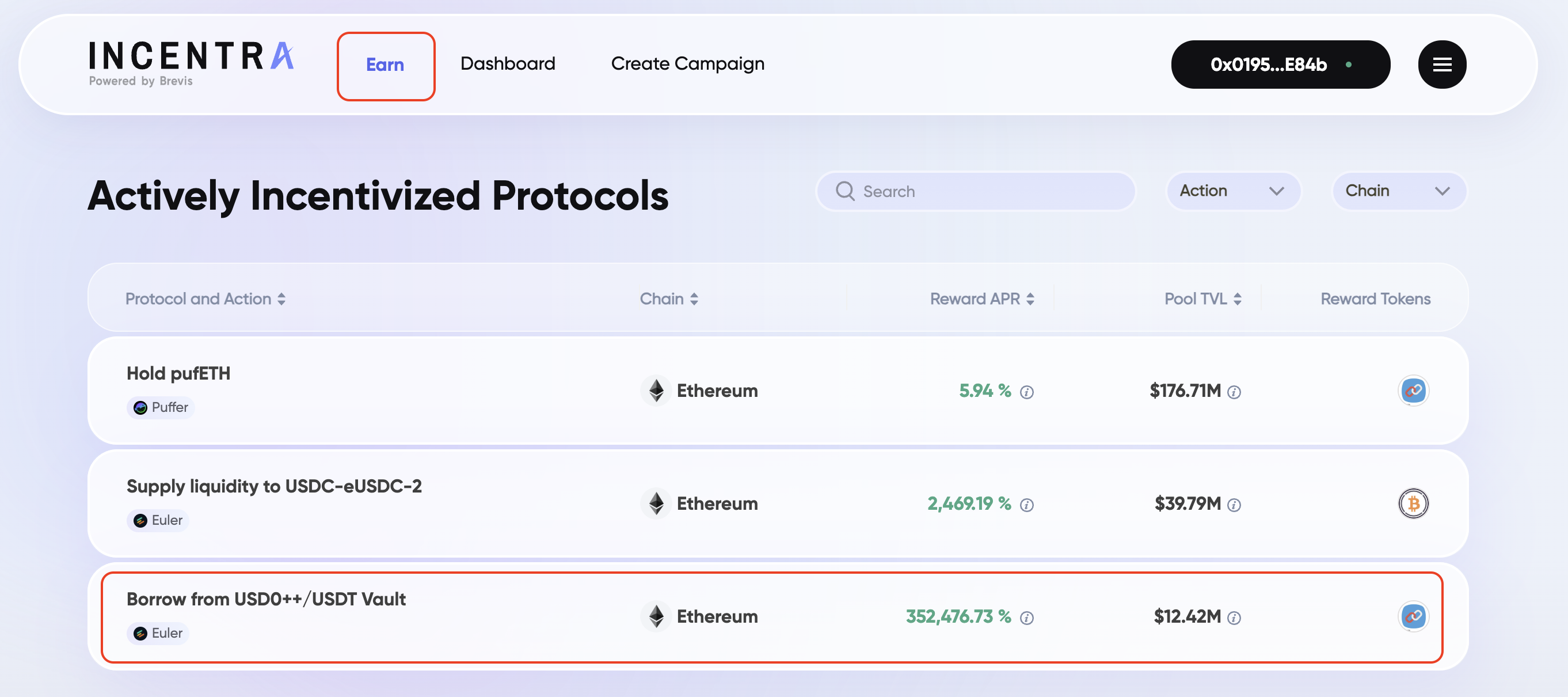
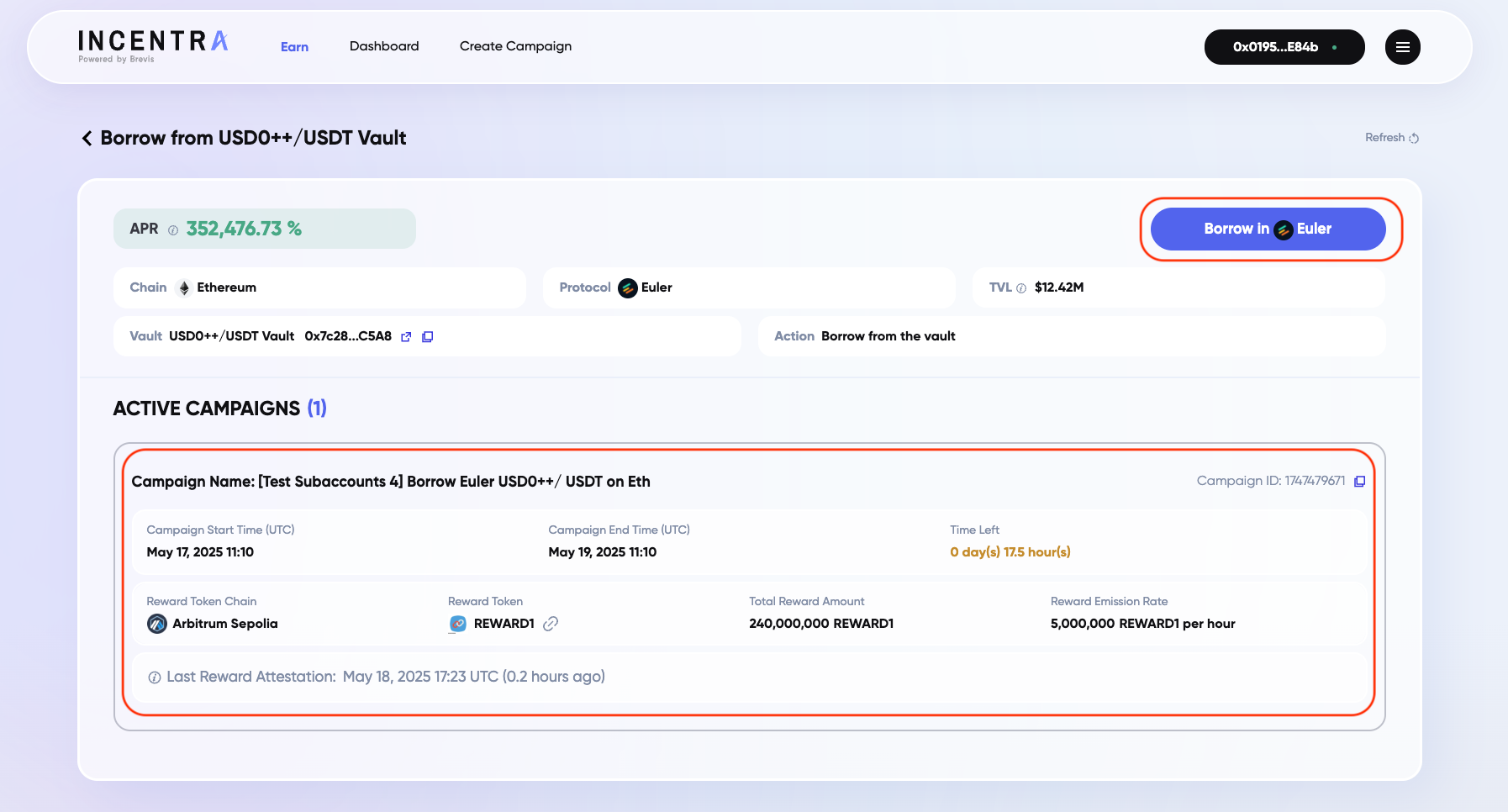
Dashboard
On the Dashboard page, you can view your claimable rewards and see all campaigns you’ve participated in—whether still active or ended with unclaimed rewards. Please note that rewards can be claimed anytime within 180 days after a campaign ends.
You can either click the ‘Claim All’ button to collect all rewards on the same chain in one single transaction, or click the ‘Claim’ button next to each campaign to claim them individually.
.png)
.png)
Guidelines
Incentra provides off-chain and on-chain APIs to fetch campaign data and let users claim their rewards. Incentive distributors can leverage these APIs to integrate Incentra with their own frontend UI to provide a seamless reward experience for users.
Specifically, the following APIs are available:
- Get Campaign: APIs for retrieve campaigns details by different criteria (e.g., by chain, by protocol, by campaign ID, by user).
- Read and Claim Rewards: on-chain interfaces for fetching and claiming a user’s claimable rewards.
- Get User Leaderboard: APIs for retrieving all users and their cumulative rewards by campaign ID.
Get Campaigns
Incentra provides restful APIs to access the campaign data.
Core Functionality
The SDK provides details about different types of incentive campaigns launched on Incentra:
- Concentrated Liquidity Campaigns - Incentivize providing concentrated liquidity in DEXes.
- Token Holding Campaigns - Incentivize holding specific tokens.
- Lend and Borrow Campaigns (Euler) - Incentivize lending or borrowing from Euler finance.
Concentrated Liquidity Campaign
This page provides a detailed reference for the GetLiquidityCampaigns API, which allows you to retrieve information about concentrated liquidity campaigns for DEXes.
Endpoint
POST https://incentra-prd.brevis.network/sdk/v1/liquidityCampaigns
Request
| Field | Type | Description |
|---|---|---|
chain_id | [uint64] | Filter by the chain ID(s) where the targeted DEX pool is deployed. |
campaign_type | [CampaignType] | Filter by the DEX protocols. Enum will be specified later. |
pool_id | [string] | Filter by pool identifier (e.g., pool address or ID). |
campaign_id | [string] | Filter by specific campaign ID(s). |
status | [CampaignStatus] | Filter by campaign status(es). Enum will be specified later. |
user_address | [string] | Retrieve campaigns where the specified user address(es) has participated. |
If any filter is not specified, it means there is no constraint for this filter.
The CampaignType enum has the following values:
UNISWAP_V3:1UNISWAP_V4:2PANCAKE_V3:3PANCAKE_V4:4QUICKSWAP_V3:5KOALASWAP:6PANCAKE_V4_CL:8PANCAKE_V4_BIN:9
CampaignStatus Enum
The CampaignStatus enum has the following values:
DEPLOYINGCREATING_FAILEDINACTIVEACTIVEENDEDDEACTIVATED
Response
| Field | Type | Description |
|---|---|---|
err | ErrMsg | Error details if the request failed. |
campaigns | [LiquidityCampaignInfo] | List of matching liquidity campaigns. |
LiquidityCampaignInfo Fields
Each campaign includes the following fields:
| Fileld | Type | Description |
|---|---|---|
chain_id | uint64 | Chain ID where the liquidity pool is deployed. |
campaign_type | CampaignType | The DEX protocol/version for the campaign. |
pools | PoolInfo | Information about the specific liquidity pool targeted by the campaign. |
campaign_id | string | Unique identifier for the campaign. |
campaign_name | string | Campaign display name. |
start_time | uint64 | Campaign start timestamp. |
end_time | uint64 | Campaign end timestamp. |
reward_info | RewardInfo | Details about the reward token and amount. See RewardInfo below. |
last_reward_attestation_time | uint64 | Last campaign reward attestation timestamp. |
status | CampaignStatus | Current status of the campaign. See CampaignStatus enum. |
PoolInfo Fields
| Field | Type | Description |
|---|---|---|
pool_id | string | Pool identifier (e.g., pool address or pool ID). |
pool_name | string | Pool display name. |
RewardInfo Fields
| Field | Type | Description |
|---|---|---|
submission_chain_id | uint64 | Campaign reward submission chain ID (see on-chain reward claim for details). |
submission_contract | string | Campaign reward submission contract address (see on-chain reward claim for details) |
claim_chain_id | uint64 | Chain ID where rewards can be claimed. |
claim_contract | string | Smart contract address for claiming rewards. |
token_address | string | Reward token address. |
token_symbol | string | Reward token symbol. |
reward_amt | string | Total reward amount for the campaign. |
reward_usd_price | string | USD price per reward token. |
reward_per_hour | string | Reward amount distributed per hour. |
apr | float | The APR of the campaign (for example, 0.03 means 3% APR) |
tvl | float | The TVL of the liquidity pool (in USD value) |
Example Request (curl)
{
    "chain_id": [
        1,
        42161
    ],
    "campaign_type": [
        1,
        2,
        3,
        4,
        5
    ],
    "pool_id": [
        "0xD0A4c8A1a14530C7C9EfDaD0BA37E8cF4204d230"
    ],
    "campaign_id": [],
    "status": [
        4,
        5
    ],
    "user_address": [] // no constraint for this filter
}
Post with data.json
curl -X POST -H "Content-Type: application/json" -d @data.json https://incentra-prd.brevis.network/sdk/v1/liquidityCampaigns
Token Holding Campaign
This page provides a detailed reference for the GetTokenHoldingCampaigns API, which allows you to retrieve information about token holding campaigns by different filters.
Endpoint
POST https://incentra-prd.brevis.network/sdk/v1/tokenholdingCampaigns
Request
| Field | Type | Description |
|---|---|---|
chain_id | [uint64] | Chain ID(s) where the target token is deployed. |
token_address | [string] | Filter by the address(es) of the token being held for the campaign. |
campaign_id | [string] | Filter by specific campaign ID(s). |
status | [CampaignStatus] | Filter by campaign status(es). Enum will be specified later. |
user_address | [string] | Retrieve campaigns where the specified user address(es) has participated. |
If any filter is not specified, it means there is no constraint for this filter.
CampaignStatus Enum
The CampaignStatus enum has the following values:
DEPLOYINGCREATING_FAILEDINACTIVEACTIVEENDEDDEACTIVATED
Response
| Field | Type | Description |
|---|---|---|
err | ErrMsg | Error message. |
campaigns | [TokenHoldingCampaignInfo] | List of matching token holding campaigns. |
TokenHoldingCampaignInfo Fields
| Field | Type | Description |
|---|---|---|
chain_id | uint64 | Chain ID where the target token is deployed. |
token_address | string | Address of the token being held. |
token_symbol | string | Symbol of the token being held (e.g., "WETH", "USDC"). |
campaign_id | string | Campaign ID. |
campaign_name | string | Campaign display name. |
start_time | uint64 | Campaign start timestamp. |
end_time | uint64 | Campaign end timestamp. |
reward_info | RewardInfo | Details about the reward token and amount. See RewardInfo below. |
last_reward_attestation_time | uint64 | Timestamp of the last reward calculation/snapshot. |
status | CampaignStatus | Current status of the campaign. See CampaignStatus enum. |
RewardInfo Fields
| Field | Type | Description |
|---|---|---|
submission_chain_id | uint64 | Campaign reward submission chain ID (see on-chain reward claim for details) |
submission_contract | string | Campaign reward submission contract address (see on-chain reward claim for details) |
claim_chain_id | uint64 | Chain ID where rewards can be claimed. |
claim_contract | string | Address of the smart contract used for claiming rewards. |
token_address | string | Address of the reward token. |
token_symbol | string | Symbol of the reward token (e.g., "WETH"). |
reward_amt | string | Total reward amount for this campaign. |
reward_usd_price | string | USD price for the reward token. |
reward_per_hour | string | Reward amount distributed per hour. |
apr | float | The APR of the campaign (for example, 0.03 means 3% APR) |
tvl | float | The total supply USD value of the token to be held |
Example Request (curl)
{
    "chain_id": [
        1,
        42161
    ],
    "token_address": [
        "0x8D983cb9388EaC77af0474fA441C4815500Cb7BB"
    ],
    "campaign_id": [

    ],
    "status": [
        4,
        5
    ],
    "user_address": [

    ]
}
post with data.json
curl -X POST -H "Content-Type: application/json" -d @data.json https://incentra-prd.brevis.network/sdk/v1/tokenholdingCampaignsityCampaigns
Lend and Borrow Campaign (Euler)
This page specifies the API for retrieving details about Lend/Borrow campaigns for the Euler protocol.
Endpoint
POST https://incentra-prd.brevis.network/sdk/v1/eulerCampaigns
Request
| Field | Type | Description |
|---|---|---|
chain_id | [uint64] | Chain ID(s) where the targeted Euler vault is deployed. |
vault_address | [string] | List of targeted Euler vault contract addresses. |
action | [uint64] | Filter by campaign action type: borrow: 2001, lend: 2002. |
campaign_id | [string] | List of specific campaign IDs to retrieve. |
status | [CampaignStatus] | Filter by campaign status (enum will be specified later) |
user_address | [string] | Retrieve campaigns where the specified user address(es) has participated. |
If any filter is not specified, it means there is no constraint for this filter.
CampaignStatus Enum
The CampaignStatus enum has the following values:
DEPLOYINGCREATING_FAILEDINACTIVEACTIVEENDEDDEACTIVATED
Response
| Field | Type | Description |
|---|---|---|
err | ErrMsg | Error message if request fails. |
campaigns | [EulerCampaignInfo] | List of Euler campaign details. |
EulerCampaignInfo Fields
| Field | Type | Description |
|---|---|---|
chain_id | uint64 | Chain ID where the targeted Euler vault is deployed. |
vault_address | string | Euler vault address. |
action | uint64 | Campaign action type: borrow: 2001, lend: 2002. |
campaign_id | string | Unique identifier for the campaign. |
campaign_name | string | Campaign display name |
start_time | uint64 | Campaign start timestamp. |
end_time | uint64 | Campaign end timestamp. |
reward_info | RewardInfo | Details about the reward token and amount. See RewardInfo below. |
last_reward_attestation_time | uint64 | Last campaign reward attestation timestamp. |
status | CampaignStatus | Current status of the campaign. See CampaignStatus enum. |
RewardInfo Fields
| Field | Type | Description |
|---|---|---|
submission_chain_id | uint64 | Campaign reward submission chain ID (see on-chain reward claim for details). |
submission_contract | string | Campaign reward submission contract address (see on-chain reward claim for details) |
claim_chain_id | uint64 | Chain ID where rewards can be claimed. |
claim_contract | string | Reward claim contract address. |
token_address | string | Reward token address. |
token_symbol | string | Reward token symbol. |
reward_amt | string | Reward amount. |
reward_usd_price | string | USD price for the reward token. |
reward_per_hour | string | Reward amount distributed per hour. |
apr | float | The APR of the campaign (for example, 0.03 means 3% APR) |
tvl | float | The supply/borrow USD value of the vault |
Post Example (curl)
{
    "chain_id": [
        1,
        42161
    ],
    "vault_address": [
        "0xF037eeEBA7729c39114B9711c75FbccCa4A343C8"
    ],
    "campaign_id": [

    ],
    "status": [
        4
    ],
    "user_address": [],
    "action": [
        2001,
        2002
    ]
}
post with data.json:
curl -X POST -H "Content-Type: application/json" -d @data.json POST https://incentra-prd.brevis.network/sdk/v1/eulerCampaigns
Lend and Borrow Campaign (Aave)
This page specifies the API for retrieving details about Lend/Borrow campaigns for the Aave protocol.
Endpoint
POST https://incentra-prd.brevis.network/sdk/v1/aaveCampaigns
Request
| Field | Type | Description |
|---|---|---|
chain_id | [uint64] | Chain ID(s) where the targeted Aave vault is deployed. |
atoken_address | [string] | List of targeted Aave atoken contract addresses. |
action | [uint64] | Filter by campaign action type: lend: 5001, borrow: 5002 , lend_net: 5003. |
campaign_id | [string] | List of specific campaign IDs to retrieve. |
status | [CampaignStatus] | Filter by campaign status (enum will be specified later) |
user_address | [string] | Retrieve campaigns where the specified user address(es) has participated. |
If any filter is not specified, it means there is no constraint for this filter.
CampaignStatus Enum
The CampaignStatus enum has the following values:
DEPLOYINGCREATING_FAILEDINACTIVEACTIVEENDEDDEACTIVATED
Response
| Field | Type | Description |
|---|---|---|
err | ErrMsg | Error message if request fails. |
campaigns | [AaveCampaignInfo] | List of Aave campaign details. |
AaveCampaignInfo Fields
| Field | Type | Description |
|---|---|---|
chain_id | uint64 | Chain ID where the targeted Aave atoken is deployed. |
vault_address | string | Aave atoken address. |
action | uint64 | Campaign action type: lend: 5001, borrow: 5002 , lend_net: 5003. |
campaign_id | string | Unique identifier for the campaign. |
campaign_name | string | Campaign display name |
start_time | uint64 | Campaign start timestamp. |
end_time | uint64 | Campaign end timestamp. |
reward_info | RewardInfo | Details about the reward token and amount. See RewardInfo below. |
last_reward_attestation_time | uint64 | Last campaign reward attestation timestamp. |
status | CampaignStatus | Current status of the campaign. See CampaignStatus enum. |
RewardInfo Fields
| Field | Type | Description |
|---|---|---|
submission_chain_id | uint64 | Campaign reward submission chain ID (see on-chain reward claim for details). |
submission_contract | string | Campaign reward submission contract address (see on-chain reward claim for details) |
claim_chain_id | uint64 | Chain ID where rewards can be claimed. |
claim_contract | string | Reward claim contract address. |
token_address | string | Reward token address. |
token_symbol | string | Reward token symbol. |
reward_amt | string | Reward amount. |
reward_usd_price | string | USD price for the reward token. |
reward_per_hour | string | Reward amount distributed per hour. |
apr | float | The APR of the campaign (for example, 0.03 means 3% APR) |
tvl | float | The supply/borrow USD value of the vault |
Post Example (curl)
{
    "chain_id": [
        1,
        42161
    ],
    "atoken_address": [
        "0x4d5F47FA6A74757f35C14fD3a6Ef8E3C9BC514E8"
    ],
    "campaign_id": [

    ],
    "status": [
        4
    ],
    "user_address": [],
    "action": [
        5001,
        5002,
        5003
    ]
}
post with data.json:
curl -X POST -H "Content-Type: application/json" -d @data.json POST https://incentra-prd.brevis.network/sdk/v1/aaveCampaigns
Lend Campaign (Morpho)
This page specifies the API for retrieving details about Lend campaigns for the Morpho protocol.
Endpoint
POST https://incentra-prd.brevis.network/sdk/v1/morphoCampaigns
Request
| Field | Type | Description |
|---|---|---|
chain_id | [uint64] | Chain ID(s) where the targeted Morpho vault is deployed. |
vault_address | [string] | List of targeted Morpho vault contract addresses. |
action | [uint64] | Filter by campaign action type: lend: 6001 . |
campaign_id | [string] | List of specific campaign IDs to retrieve. |
status | [CampaignStatus] | Filter by campaign status (enum will be specified later) |
user_address | [string] | Retrieve campaigns where the specified user address(es) has participated. |
If any filter is not specified, it means there is no constraint for this filter.
CampaignStatus Enum
The CampaignStatus enum has the following values:
DEPLOYINGCREATING_FAILEDINACTIVEACTIVEENDEDDEACTIVATED
Response
| Field | Type | Description |
|---|---|---|
err | ErrMsg | Error message if request fails. |
campaigns | [MorphoCampaignInfo] | List of Morpho campaign details. |
CampaignInfo Fields
| Field | Type | Description |
|---|---|---|
chain_id | uint64 | Chain ID where the targeted Morpho vault is deployed. |
vault_address | string | Morpho vault address. |
action | uint64 | Campaign action type: lend: 6001. |
campaign_id | string | Unique identifier for the campaign. |
campaign_name | string | Campaign display name |
start_time | uint64 | Campaign start timestamp. |
end_time | uint64 | Campaign end timestamp. |
reward_info | RewardInfo | Details about the reward token and amount. See RewardInfo below. |
last_reward_attestation_time | uint64 | Last campaign reward attestation timestamp. |
status | CampaignStatus | Current status of the campaign. See CampaignStatus enum. |
RewardInfo Fields
| Field | Type | Description |
|---|---|---|
submission_chain_id | uint64 | Campaign reward submission chain ID (see on-chain reward claim for details). |
submission_contract | string | Campaign reward submission contract address (see on-chain reward claim for details) |
claim_chain_id | uint64 | Chain ID where rewards can be claimed. |
claim_contract | string | Reward claim contract address. |
token_address | string | Reward token address. |
token_symbol | string | Reward token symbol. |
reward_amt | string | Reward amount. |
reward_usd_price | string | USD price for the reward token. |
reward_per_hour | string | Reward amount distributed per hour. |
apr | float | The APR of the campaign (for example, 0.03 means 3% APR) |
tvl | float | The supply USD value of the vault |
Post Example (curl)
{
    "chain_id": [
        1,
    ],
    "atoken_address": [
        "0xb576765fB15505433aF24FEe2c0325895C559FB2"
    ],
    "campaign_id": [

    ],
    "status": [
        4
    ],
    "user_address": [],
    "action": [
        6001,
    ]
}
post with data.json:
curl -X POST -H "Content-Type: application/json" -d @data.json POST https://incentra-prd.brevis.network/sdk/v1/morphoCampaigns
Read and Claim Rewards
Same-chain reward claim
If the ZK-attested rewards information is submitted to the same chain that hosts the campaign for users to claim rewards, the reward claim process is straightforward: call the following functions.
// claim reward, send reward token to the earner
function claim(address earner) external;

// claim reward, send reward token to address specified by the earner (msg.sender)
function claimWithRecipient(address to) external;
One can obtain a user’s cumulative rewards and unclaimed rewards through the following view functions.
struct AddrAmt {
    address token;
    uint256 amount;
}

// get cumulative rewards
function viewTotalRewards(address user) external view returns (AddrAmt[] memory) ;
// get unclaimed rewards
function viewUnclaimedRewards(address earner) external view returns (AddrAmt[] memory);
Cross-chain reward claim
To reduce the gas cost of the campaign on an expensive chain (e.g., Ethereum), we can configure the system to submit ZK-attested rewards on a more affordable chain (e.g., Optimism, Arbitrum), then bridge the Merkle root of all rewards back to the campaign chain.
In this case, there are 2 contracts:
- Rewards Submission contract where the ZK-proved rewards are submitted. The Rewards Submission contract builds and stores the entire reward Merkle tree.
- Rewards Claim contract that synchronizes the Merkle root from the Rewards Submission contract. Users interact with this contract to claim their rewards by providing a Merkle proof. This contract also escrows the rewards and stores each user’s already-claimed reward amount.
To claim rewards, the user needs to
- Obtain the reward information along with the Merkle proof by calling the Get Reward Merkle Proof API.
- Submit the reward information along with the Merkle proof to the Reward Claim contract.
NOTE: There is also a “ClaimAll” contract which can help claim a user’s rewards from multiple campaigns in a single transaction. See here for details.
// claim reward, send reward token to the earner
function claim(
    address earner,
    uint256[] calldata cumulativeAmounts,
    uint64 epoch,
    bytes32[] calldata proof) external;

// claim reward, send reward token to address specified by the earner (msg.sender)
function claimWithRecipient(
    address to,
    uint256[] calldata cumulativeAmounts,
    uint64 _epoch,
    bytes32[] calldata proof
) external
To get a user’s claimable reward amount:
A user’s currently claimable reward amount and the cumulative reward amount can be obtained by calling the Get Reward Merkle Proof API (enclosed together with the Merkle proof) or Get Reward Balance API (an API dedicated to display a user’s reward balances).
Get Reward Merkle Proof API
This API returns the reward info and the corresponding Merkle proofs of a specific user in multiple campaigns that the user has participated in (i.e., has non-zero cumulative rewards in the campaign) and match the supplied filters in the request. The data included in the response can be used to call the claim or claimWithRecipient functions of the claim chain contract.
Endpoint
POST https://incentra-prd.brevis.network/v1/getMerkleProofsBatch
Request Fields
The request data should specify a user address and multiple filters for the campaign.
NOTE: user_addr is a required field while other filters are optional. If any filter is not specified in the request, it means no constraint for the filter.
| Field | Type | Description |
|---|---|---|
user_addr | string | The user address. |
types | [CampaignType] | The campaign types (the detailed enum will be specified later). |
chain_id | [uint64] | The chain IDs where the DEX pools/Euler vaults/tokens are deployed. |
status | [CampaignStatus] |
The campaign statuses with enum:
|
campaign_id | [string] | The campaign IDs. |
CampaignType enum:
- Liquidity campaign (Uniswap v3) = 1
- Liquidity campaign (PancakeSwap v3) = 3
- Liquidity campaign (QuickSwap v3) = 5
- Token holding campaign = 1001
- Euler borrow campaign = 2001
- Euler lend campaign = 2002
Response Fields
| Field | Type | Description |
|---|---|---|
err | ErrMsg | Error details if the request failed. |
rewardsBatch | [SingleCampaignMerkle] | An array that includes the details about rewards info and the corresponding Merkle proofs of the user in all the campaigns that user has participated in and match the filters. |
ErrMsg Fields
| Field | Type | Description |
|---|---|---|
code | string | Error code |
msg | string | Error reason |
SingleCampaignMerkle Fields
| Fileld | Type | Description |
|---|---|---|
campaignId | string | The campaign ID. |
epoch | string | The rewards in the Merkle tree is accumulated up to this epoch number. |
claimChainId | string | The claim chain ID. |
claimContractAddr | string | The claim contract address. |
cumulativeRewards | [string] | The cumulative reward amount earned by the user in the campaign so far. |
merkleProof | [string] | The Merkle path proof to be submitted to the claim contract. |
claimableRewards | string | The claimable reward amount of this user in the campaign. |
Example Request (curl)
curl --location 'https://incentra-prd.brevis.network/v1/getMerkleProofsBatch' \
--header 'Content-Type: application/json' \
--data '{
    "user_addr": "0x0195b198088e464103e3840f52a1fa9ea81de84b",
    "types": [
        1001
    ],
    "chain_id": [
        1
    ],
    "status": [],
    "campaign_id": []
}'
Get Reward Balance API
This API returns the cumulative and claimable reward balances of a specific user in all campaigns the user has participated in and match the specified filters.
Endpoint
POST https://incentra-prd.brevis.network/v1/getUserRewardsBatch
Request Fields
The request data should specify a user address and multiple filters for the campaign.
NOTE: user_addr is a required field while other filters are optional. If any filter is not specified in the request, it means no constraint for the filter.
| Field | Type | Description |
|---|---|---|
user_addr | string | The user address. |
types | [CampaignType] | The campaign types (the detailed enum will be specified later). |
chain_id | [uint64] | The chain IDs where the DEX pools/Euler vaults/tokens are deployed. |
status | [CampaignStatus] |
The campaign statuses with enum:
|
campaign_id | [string] | The campaign IDs. |
CampaignType enum:
- Liquidity campaign (Uniswap v3) = 1
- Liquidity campaign (PancakeSwap v3) = 3
- Liquidity campaign (QuickSwap v3) = 5
- Token holding campaign = 1001
- Euler borrow campaign = 2001
- Euler lend campaign = 2002
Response Fields
| Field | Type | Description |
|---|---|---|
err | ErrMsg | Error details if the request failed. |
rewardsBatch | [SingleCampaignReward] | An array that contains the reward balances of the user in all the campaigns that user has participated in and match the filters. |
ErrMsg Fields
| Field | Type | Description |
|---|---|---|
code | string | Error code. |
msg | string | Error reason. |
SingleCampaignReward Fields
| Fileld | Type | Description |
|---|---|---|
cumulative | string | The cumulative reward amount earned by the user in the campaign. |
claimable | string | The claimable reward amount of the user in the campaign. |
campaignId | string | The campaign ID. |
claimChainId | string | The claim chain ID. |
Example Request (curl)
curl --location 'https://incentra-prd.brevis.network/v1/getUserRewardsBatch' \
--header 'Content-Type: application/json' \
--data '{
    "user_addr": "0x0195b198088e464103e3840f52a1fa9ea81de84b",
    "types": [
        1001
    ],
    "chain_id": [
        1
    ],
    "status": [],
    "campaign_id": []
}'
Claim all rewards in a single transaction
A user can claim all rewards from all participated campaigns on a given chain in a single transaction by calling the following functions of the ClaimAll contract deployed on that chain:
// claim all same-chain rewards
function claimAll(address earner, address[] calldata campaignAddrs) external;

// claim all cross-chain rewards
// calldata can be fetched using the getMerkleProofsBatch API
struct CampaignReward {
    address campaignAddr; // the campaign claim contract address
    uint256[] cumulativeAmounts;
    uint64 epoch;
    bytes32[] proof;
}
function claimAll(address earner, CampaignReward[] calldata campaignRewards) external;

// claim all same-chain and cross-chain rewards
function claimAll(
    address earner,
    address[] calldata sameChainCampaignAddrs,
    CampaignReward[] calldata crossChainCampaignRewards) external;
The currently deployed ClaimAll contract addresses are:
| Chain | ClaimAll contract address |
|---|---|
| Ethereum | 0x39ae8501186E8F4d7b120981DDaD5db8915A6371 |
| BNB Chain | 0x3704597fdE1f11E4C87423B9246b295c31bfbb8d |
| Arbitrum | 0x273d0d19eaC2861FCF6B21893AD6d71b018E25aB |
| World Chain | 0xc8c741C7C4844Cd3C4B60d8dc95DF1DC452C53c6 |
| Arbitrum Sepolia Testnet | 0x8fa1Bd18F30e0b387E2f24279Eca033eb2a30327 |
| Base Sepolia Testnet | 0x39ae8501186E8F4d7b120981DDaD5db8915A6371 |
Get User Leaderboard
Retrieve a CSV file that displays all the users who have rewards in the campaign and their cumulative rewards by a given Campaign ID.
Endpoint
GET https://incentra-prd.brevis.network/sdk/v1/userRewards
Example (curl)
curl https://incentra-prd.brevis.network/sdk/v1/userRewards?campaign_id=1745558044
Response:
{
    "err": null,
    "url": "https://incentra-user-reward-csv.s3.us-west-2.amazonaws.com/campaign-1745985401-rewards-20250506-061050.csv"
}
CSV name rule:
campaign-{campaignID}-rewards-{dateTime}.csv
campaignID: The unique ID for a campaigndateTime: In"YYMMDD-HHmmss"format, UTC. For example,20250506-151050represents2025-05-06 15:10:50.
CSV Format
The CSV including the 2 columns, User And EarnedAmount
- User: user address
- EarnedAmount: the accumulated amount of reward tokens earned by each user in the campaign
The CSV table sort in descending order by Total Rewards Earned.
Supported Chains and Protocols
If you would like to create campaigns for new chains or new protocols, please contact us.
Supported Protocols
| Protocol Type | Campaign Type | Protocol Name |
|---|---|---|
| ERC-20 Token | Token Holding | Any protocol requiring ERC-20 token holding |
| DEX | Concentrated Liquidity | Uniswap v3 |
| DEX | Concentrated Liquidity | PancakeSwap v3 |
| DEX | Concentrated Liquidity | KoalaSwap |
| Lending Protocol | Lend and Borrow | Euler Finance |
Supported Chains
- Ethereum
- Arbitrum
- OP
- Linea
- BNB Chain
- Base
- World Chain
- TAC
- UNITS Network
Github
Incentra Contract:
https://github.com/brevis-network/incentra-contracts
Audit reports
Incentra contract audit reports:
https://github.com/brevis-network/incentra-contracts/tree/main/audit